Page not Loading in Spanish

Hi there,
We are facing a issue on this page https://www.mango.org/es/professionals/industria/, when we are editing this page into Cornerstone, it is loading contents into English language while it should be load Spanish content. Can you help us to fix this problem? We have faced same issue with many other pages, Cornerstone is not working properly.
Please solve this issue for us.

Thanks & Regard

Hi @mvcagency,

Thanks for reaching out.

May I know how you translated it? It appears that you edited it in the standard editor and changes the text within the shortcode content. It will appear translated since the shortcode will be executed, but not in the builder since the data aren’t actually translated. You should translate it in the builder, but if I’m wrong then please provide more information of how it’s translated so I could repeat it and see if it’s a bug or error.

Thanks!

I have translated it in Cornerstone Editor, if you look at the page design and its layout on https://www.mango.org/es/professionals/industria/ you will clearly understand that it is built in Cornerstone.
It happens often when a page is loading properly in Spanish but sometime it not loading the content at all or loading English content instead of Spanish and when we save the page then it is not opening normally in Cornerstone Editor, and when we are opening it forcefully it’s showing English Content.

We have faced this issue for many pages.

Thanks

Hey Nicholas,

This was a known issue which has been corrected in Cornerstone 3.1.0. Your currently using Cornerstone 3.0.4. Please update to the latest version.

BUGFIX: Creating new WPML translations in the builder will always use “Translate Independently”.

Thanks.

Ok, Thanks,
I have updated the Cornerstone, performance of the plugin is better than previous version. But still https://www.mango.org/es/professionals/industria/ page is not opening in Cornerstone.

Sorry for the lack of info. Cornerstone now uses “Translate Independently”. This means that your old Spanish page is no longer connected to Cornerstone so you would need to edit first your English page then switch to Spanish, then you would need to translate again.

In the screenshot below, there is no “Edit Pagina” link showing that it is not connected to Cornerstone.
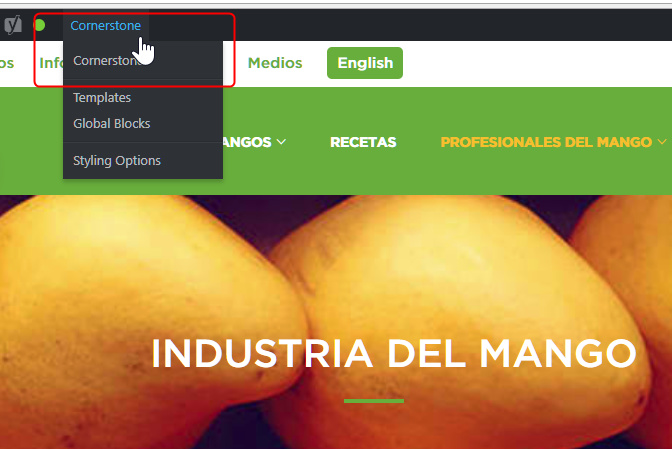
We understand this is inconvenient but this is regretfully necessary because of technical conflicts in the previous versions.

To demonstrate what I mean, I manually translated your page https://www.mango.org/es/professionals/industria/ again. After saving the new Spanish page in Cornerstone, you’ll see that the “Edit Pagina” link is now back. Please see the secure note of the recording I did to show you a way to translate a bit quickly.
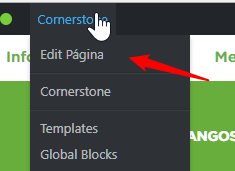
I left out the Contact section for you to translate so you get the idea. You would also need to do this for other pages.

We’re very sorry for the inconvenience this has caused you.
This topic was automatically closed 10 days after the last reply. New replies are no longer allowed.