Hi, I am working on a new page. When I view the page when not logged into WP, it is all messed up. It is displaying code, and the images are not there. Any idea what’s wrong? Thanks so much!
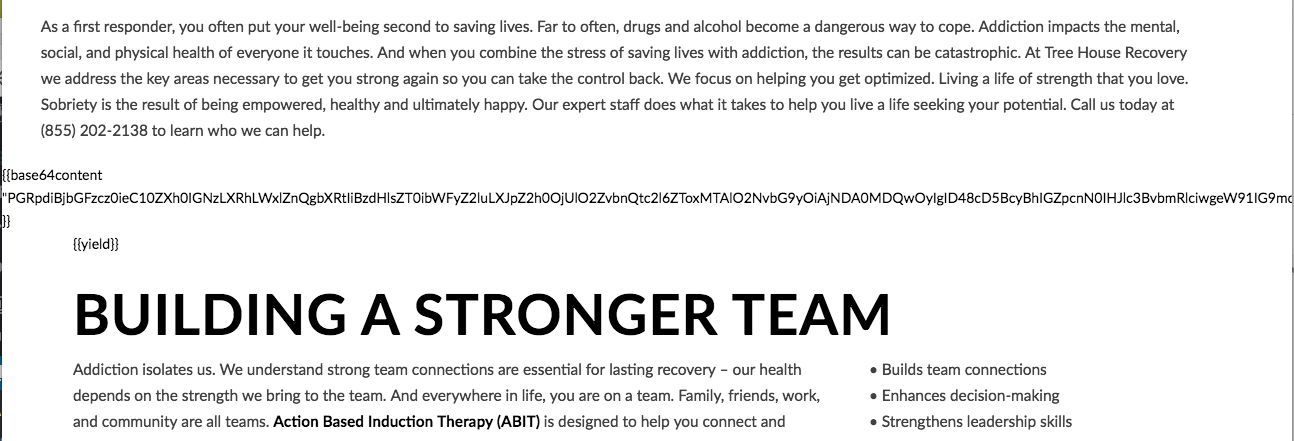
Hi, I am working on a new page. When I view the page when not logged into WP, it is all messed up. It is displaying code, and the images are not there. Any idea what’s wrong? Thanks so much!
Hi there,
Thank you for reaching out to us. I checked your site and I see an error on the front-end which could be causing the issue, please check for the following first:
Test for a plugin conflict. You can do this by deactivating all third party plugins, and seeing if the problem remains. If it’s fixed, you’ll know a plugin caused the problem, and you can narrow down which one by reactivating them one at a time.
If you’re using a caching plugin, clear all caches including browser cache then deactivate your caching plugin and other optimization plugins. If you’re using a CDN, please clear the CDN’s cache and disable optimization services.
Remove custom CSS, JavaScript and deactivate your child theme and switch to parent theme (take a complete backup first).
Reset your htaccess file by renaming it to .htaccess-bak. Then in WP Admin Menu, go to Settings > Permalinks and just click the Save Changes button.
Try adding this code in your wp-config.php
define( 'WP_MEMORY_LIMIT', '256M' );
define( 'WP_MAX_MEMORY_LIMIT', '512M' );
Let us know how this goes!
Thanks so much for the reply. I tried all of these steps, but unfortunately none of them fixed the problem. Any ideas on what else I could try? I also tried removing the page and creating a new one (new url in the secure form). Thanks again.
Hi There,
The page is working fine without login on my side.
Please check the screenshot in secure note.
You may facing browser cache, please clear and retest it.
Thanks
This topic was automatically closed 10 days after the last reply. New replies are no longer allowed.