The headlines that I create in cornerstone are not displaying properly. They are much larger and not centered. Any ideas on how to fix this?
The headlines in question are on the artists page.
The headlines that I create in cornerstone are not displaying properly. They are much larger and not centered. Any ideas on how to fix this?
The headlines in question are on the artists page.
Hi There @hawkdog
Thanks for writing in! I have tried to login to your site, but it seems that your login credentials are invalid.
ERROR: Incorrect username or password.
Could you please confirm again with the correct information, so that we can look into your issue further.
Thanks!
Yes. here are the correct credentials.
Hello @hawkdog,
Thanks for updating the thread. 
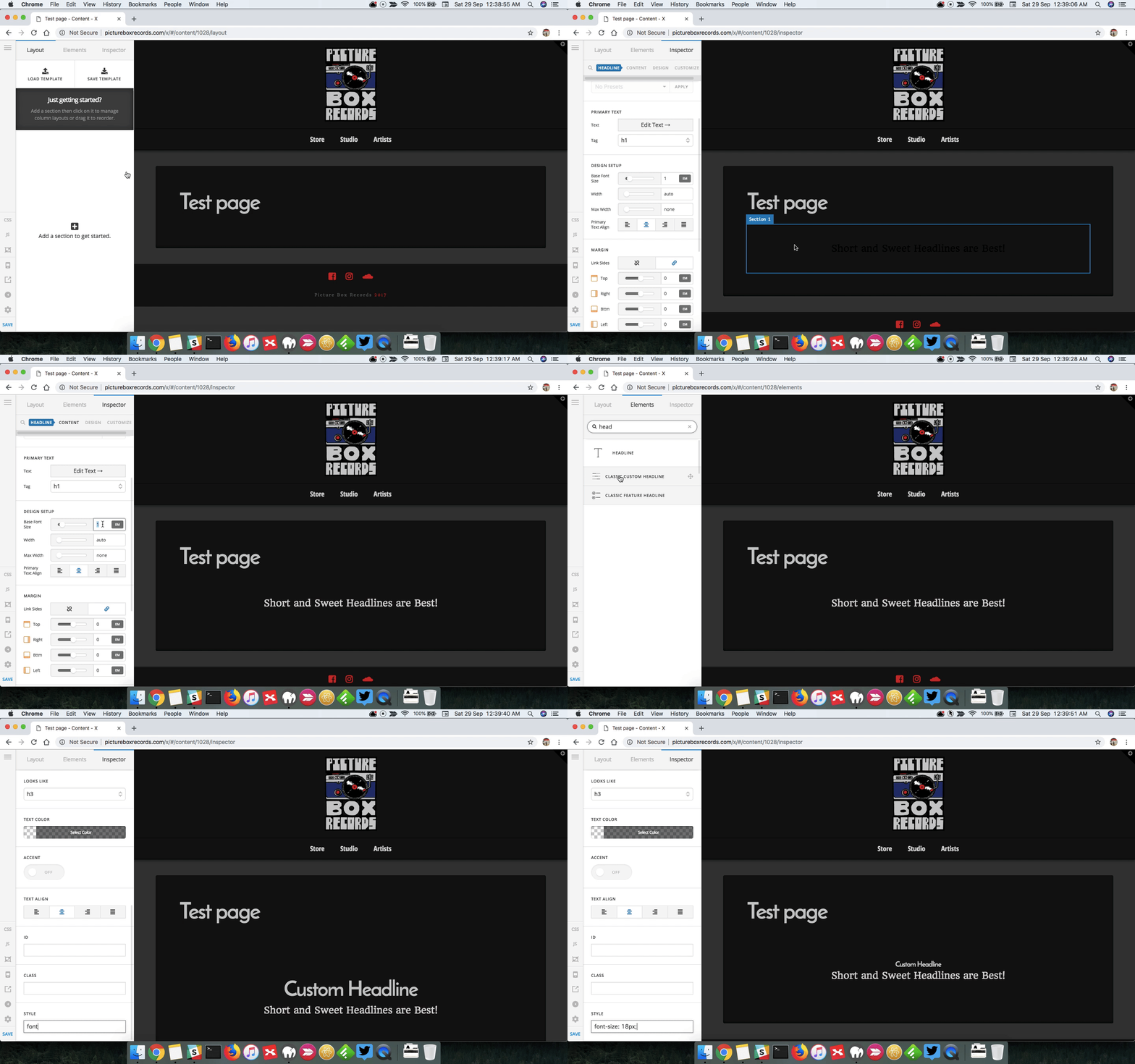
I created a test page in Draft mode and added headline element and I don’t see any issues with the font size. To center the text you can press the center button under Design Setup > Primary Text Align.
However, I added classic headline element and to control the font size, you can add following CSS in Style text box font-size: 18px;. Here’s a screencast that you an take a look.
Thanks.
This topic was automatically closed 10 days after the last reply. New replies are no longer allowed.