Page no longer displays - iframe response incomplete

Hi.

Surprisingly a page no longer displays - just all white screen.

When opening the corresponding page (a layout actually) in cornerstone I get the following error: The preview could not lad due to the iframe response being incomplete. This is most often related to a plugin conflict, or customisations introducing a PHP error.

I checked the common issues (https://theme.co/docs/common-issues#disabling-cache) so have tried hints like:

Updated everything.
Disabled all other plugins.
Removed single CSS on page and global CSS (no JS).
I have renamed .htaccess to -bak and updated the permalink.
I have added following to the wp-config:
define( ‘WP_MEMORY_LIMIT’, ‘256M’ );
define( ‘WP_MAX_MEMORY_LIMIT’, ‘512M’ );
I have cleared cache.

No change, unfortunately.

Please advise. Login credentials in secure note.
Hi @nblund,

Thanks for reaching out.
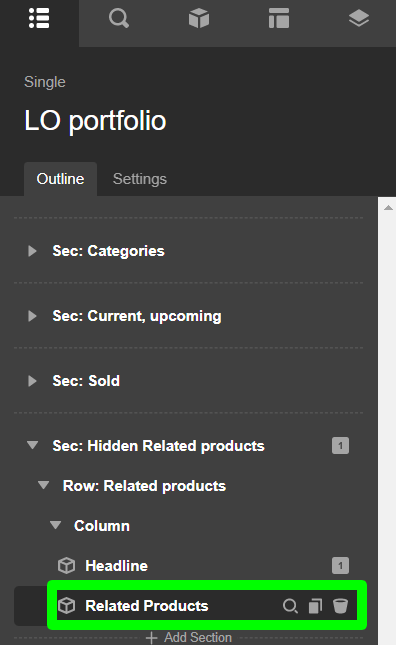
I have checked the page and found that the last section is the reason behind your problem where you have used the Related Products element but the WooCommerce is not active anymore. I would suggest you remove the element to get rid of this problem.

Hope it helps.
Thanks

It certainly did. Thanks a lot.

You are most welcome, @nblund

Hi again @prakash_s,

I am sorry, but the issue remains on another page (see Grand View portfolio item). I really don’t know where to begin (except for as explained in the above).

Can you give me a hint, please?

Thanks.

Hey @nblund,

Because you have Related Products element in your single layout, you will encounter the error.

You need to enable the WooCommerce plugin or at least remove the Related Products element to load the layout in the builder.

Best Regards.

Whew, I understand your reaction - really sorry for wasting your time on this last one.

Hi @nblund,

Glad that we are able to help you.

Thanks

This topic was automatically closed 10 days after the last reply. New replies are no longer allowed.