Page is displayed wrong in frontend

Hello,

I have created a new page and everything is working fine. The page looks like it should in the backend.
But when I open it in the frontend, the page looks different and the content is displayed incorrectly.
It is the first site I have created in this WP environment.

Can you please help me with this issue?

Thanks

Hi @l_eckardt,

Thanks for reaching out.
It might be an issue with the cache. I would suggest you clear the Styled Cache from the X/Pro > Settings and update it before check.

If that does not resolves, there might be some different reasons behind your issue, I would like to suggest troubleshoot the following common issue to help us to recognize the reason.

1.Plugin Conflict
2.Theme Update related issue
3.Child Theme Related issue ** if you have activated it
4.CSS/JS Customization
5.Disabling Cache
6.Disabling CDN

If you discover that an issue is coming from a custom code or 3rd party plugin, kindly consult with a developer or contact the plugin author. Please note that we do not provide support for custom codes and 3rd party plugins.
If none of the above helps and you are still getting the issue, please provide login credentials for your site in a secure note to examine it further, including:

– WordPress Site URL & Login URL
– WordPress Admin username/password

To create a secure note, click the key icon underneath any of your posts.

Thanks

Hello,

thank you very much for your reply. I tried everything but I still have the problem.

I have given you the credentials in the security note.

Hi @l_eckardt,

I have checked and found that pages are showing in the frontend properly even with the custom styling using the Content Builder. I have checked all the pages you have but didn’t recognize the problem you described.
If you have any specific page where you are getting this issue, please specify the URL along with the screenshot or video which helps us to recognize the problem.

Thanks

Hello,

it’s about this particular page: Camano Bodywear.
In the content builder view, the headline is not in the middle of the page
and the 4 text elements at the bottom of the page span the entire page.
Can you see the difference?

Hi @l_eckardt,

I just check your Camano Body wear page. I found out that the backend and the frontend layout is just the same. I don’t see any issues on it. There could be a cache on your browser, I suggest that you clear your browser cache. If it doesn’t help, would you mind sharing with us a screenshots or videos indicating your issues?

Hope that helps.

Thank you.

Hello,

very strange, i also tried a different browser and i still have the differrence.
I share you some pictures. The Headline is different and the elements at the end.


Hi @l_eckardt,

I guess we have different resolutions that’s why we are seeing different layouts. Upon further investigation, I found out that it has something to do with the layout screen sizes.

First, let talk about your “Follow the story of Comfort” Headline.

This is what you see on the back-end:
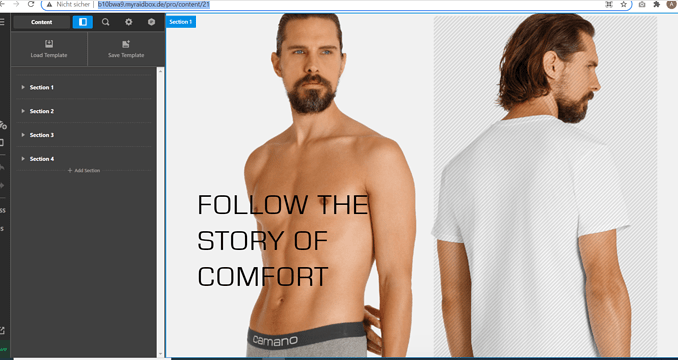
image

But what I see on my end:

With the comparison above, I believe that your browser resolution in the back-end falls under LG and in the front-end, the resolution is XL.

Layout Screens:

S > 320px to 480px
SM > 480px to 767px
MD > 767px to 979px
LG > 979px to 1200px
XL > 1200 and up

To fix your issue and follow your back-end layout, you need to change the layout screen of your XL to 2 columns because currently it is set to 1 column.

Same scenario on the Section 3 row, just also change the XL to 1 because currently it is set to 4 columns.

Hope that helps.

Thank you.

This topic was automatically closed 10 days after the last reply. New replies are no longer allowed.
