Page errors from cornerstone?

hello
i looked through a webpage on w3c validator and found that there are some errors from the x class. so its x theme related right? I have attached a screenshot of the errors i mean.

this page: http://cannadems.org/map/new-hampshire/

is there a way i could go through and fix these errors automatically? i am up to date with the theme on the website.

there is no error loading this page but our web guy told us: I apologize for this but this 500 Error is related to the website and it’s design. You are going to have to check your codes and headers as the 500 error is not Hostgator’s 500 Error but one related to your ending of headers. We did check the .htaccess and other parts of the server. The cannadems.org/wp-admin will load for your to optimize.

is this a x theme [fixable] error?
Hi There,

Would you mind providing us with login credentials so we can take a closer look? Please provide following information:

Set it as Secure Note

  • Link to your site
  • WordPress Admin username / password
  • FTP credentials

Thanks!

ok. shared a secure note with all login info.

Hey @CannaDems,

Based on your screenshot, only this code .x-topbar .p-info a:hover{color:auto} is a valid error. I’ll post this to our issue tracker.

The unrecognized parts are new CSS features that the validator does not recognize yet and does not mean that they could not be used. They are needed for the normal functioning of the theme

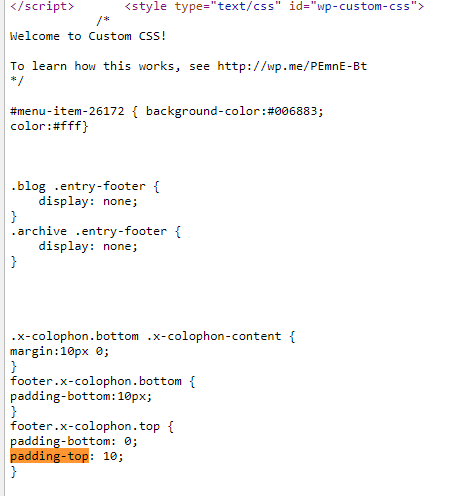
The other error, though using the theme’s class, is from your custom CSS

You should use a unit like px.

The 500 error does not come from X. Otherwise, we would have encountered that error everytime we install the theme in our test site. There are many factors that could cause that. Please see this guide to help you find the cause.

Thanks.

“Based on your screenshot, only this code .x-topbar .p-info a:hover{color:auto} is a valid error. I’ll post this to our issue tracker.”
so what happens now? what does this mean?

okie dokes. i fixed the highlighted section from the picture, added the “px” after the 10.

Glad you were able to figure it out :slight_smile:

“Based on your screenshot, only this code .x-topbar .p-info a:hover{color:auto} is a valid error. I’ll post this to our issue tracker.”
so what happens now? what does this mean?

(from the earlier comment)

Hi,

It means our web development team is made aware of it.

They will review and have it fixed in future release.

Thanks

This topic was automatically closed 10 days after the last reply. New replies are no longer allowed.