I have created a shop page on my website.
im using cornerstone to do this.
so i am creating section and columns and within those entering the amzon links/image from my affiliates page.
it seems to be working but it took alot of trial and error in wordpress to create and delete shop pages and posts to figure out the correct process. and when i went to add in my shop link page into an actual post (so a user can click on it and go straight to my shop page) the url says buydecoraterearrange.com/shop_trashed-shop/
that trashed word sure doesnt look good in the link any idea what i may have done wrong or how to fix it. i am very new to this world so changing code etc doesnt come natural to me and im sure its obvious to alot of you! thankful for the help!
Hi There,
Thanks for writing in! Head over to your WordPress pages section and make sure that you don’t have any existing pages using the name shop. Also check your trash section to make sure.
Then you can create a page named shop, then publish your page and then edit the page using Cornerstone and see if that helps.
Hope that’s clear.
thank you i did have a shop file in trash that i needed to permanently delete. so i did that.
however i still have the active page shop that has all my links on it and after refreshing it still says trash. so are you saying i should delete that shop page all together and create a new one so there is a fresh link?if so is there a way to save all of the links i have so i can simply copy and paste them into a new page?
Hi there,
You export the page template and import it to the new page in cornerstone.
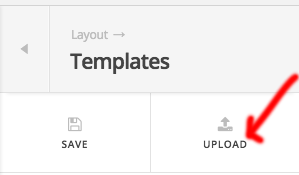
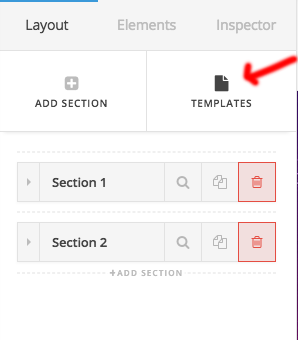
Hope that helps.
Thanks
WOW! That was REALLY HELPFUL! Thank you!! it worked perfectly…phew!
You’re welcome!
Thanks for letting us know that it has worked for you.
This topic was automatically closed 10 days after the last reply. New replies are no longer allowed.