Padding and margin not working in sections

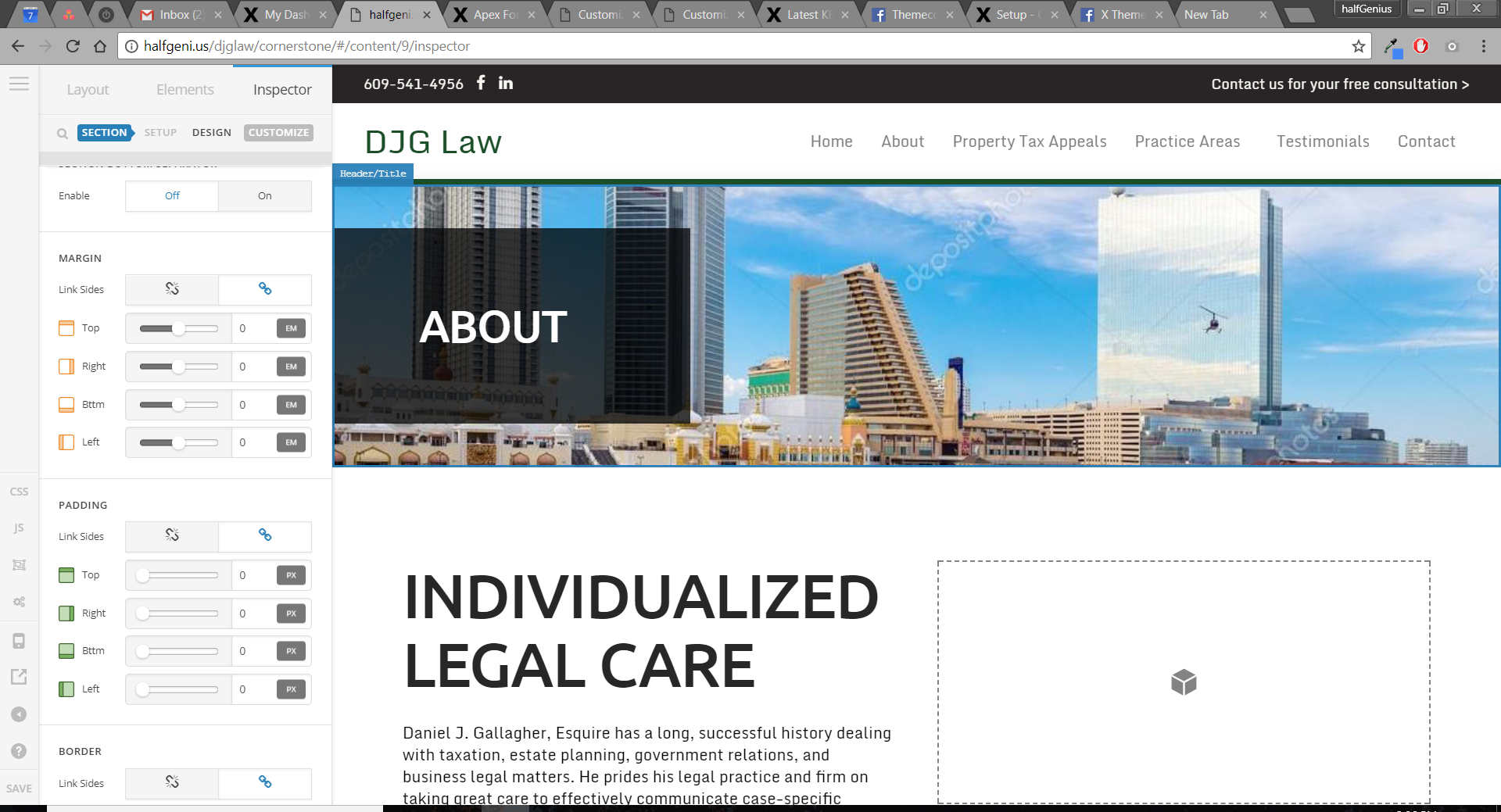
I just updated to the new version of x/pro and we are running into a few issues with the padding and margin for the section. We don’t want to have that extra space above and below the black box but for some reason the padding and margin are not responding at all. You can see in the screenshot that everything is set to 0. Even when I set everything to 100pm, %, or em, etc, nothing happens. Also, we are experiencing this on 2 sites we are building and have cleared all the cache and do not have any plugins installed on this current site.
Hi There,

Please try-entering 0px again on the padding top and bottom value boxes.

I confirmed on your website that you have 45px padding-top and bottom on your section even if your screenshot show differently.

Please confirm you are fully updated.

If you have any cache plugins, please flush the cache and test it again.

If that does not help, please turn off all third-party plugins in order to test for a plugin conflict.

If the issue persists you can apply this temporary fix on your Cornerstone CSS tab :

#cs-content .el1.x-section {
   
    padding: 0px;
}

or click on the customize tab of your section and type in the inline CSS box:

 padding: 0px; 

In case you need to use the codes provided above to fix your issue, please provide your login credentials in a secure note so we can take a closer look at your installation.

Thank you

This topic was automatically closed 10 days after the last reply. New replies are no longer allowed.