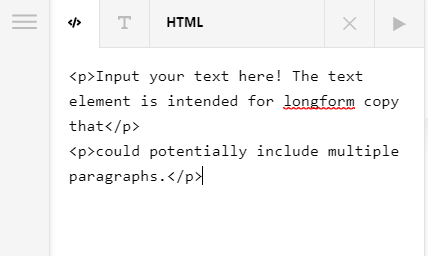
P tags stripped

I have searched forums and google and can’t find an answer besides installing tinymce advanced. ( which I did and checked the box not to strip the tags and it didn’t work. )

I do not want the p tags stripped in the text editor when switching between the html and rich text tabs in the Pro Theme editor.

Can someone help me so this stops?
Hi @Eastside
Thanks for reaching out.

The HTML tags are permissible only in the HTML editor, wheras Rich Text editor can be used as Visual editor which generates the HTML.
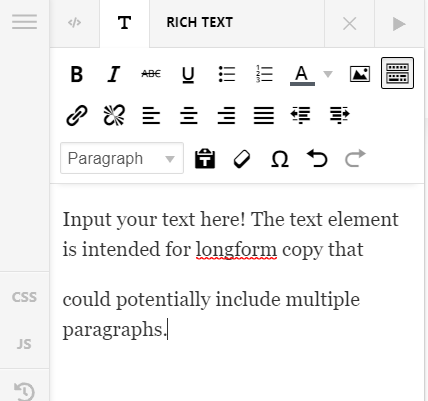
The <p> tag can be added from Rich Text editor by adding an Enter or New Line, and can be seen in HTML editor. You can add the <p> tag similarly as shown in the screenshot.

Test-07-09-200-Content-Pro (12)

Test-07-09-200-Content-Pro (13)

Hope it helps.
Thanks

Just so I understand, you are saying I cannot add the P tags in by hand, that I can only add it in the rich editor by hitting enter? That’s when it will stay when I flip between raw and rich??

Hey @Eastside,

You can add p tags by hand in the HTML editor. However, if you have 1 paragraph, it will be stripped away if you switch to the Rich Text editor. That behavior is inherited from WordPress so until that is changed, regretfully, the only solution is to have 2 paragraphs within the Rich Text editor for the p tags not to get stripped.

Thanks.

This topic was automatically closed 10 days after the last reply. New replies are no longer allowed.