Hello,
My website is http://peinturefusion.com
I am trying to get my logo to overlap the menu (navbar) and revolution slider beneath.
I’m also trying to get navbar menu items separators colored.
Thank you for your help!
Nathalie 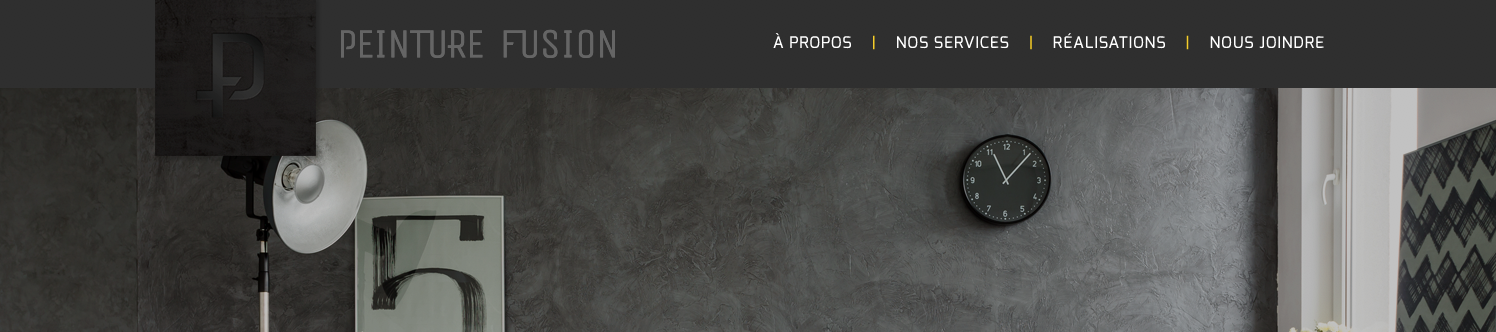
Hello,
My website is http://peinturefusion.com
I am trying to get my logo to overlap the menu (navbar) and revolution slider beneath.
I’m also trying to get navbar menu items separators colored.
Thank you for your help!
Nathalie
Hi There,
Your navbar looks fairly different from the screenshot
You can make your logo ovarlap your navbar using negative margins, so once you have a logo like the one on the screenshot, you can add to theme options css
.x-brand img {
    margin-bottom: -80px;
}
To change the color of the divider you have now you can add the following code:
.x-navbar .desktop .x-nav>li {
    border-right: 1px solid red !important;
}
Hope it helps
Thank you, it did.
However, the navbar dividers go all the way up and down the navbar. Any way to make then shorter?
Hello There,
Thanks for updating in! To make sure that the logo will overlap just in the home page only, you may update the code and use this instead:
.home .x-brand img {
    margin-bottom: -80px;
}
We would loved to know if this has work for you. Thank you.
Hi,
Thank you for your reply.
However, I would like to know if it would be possible to get the menu items separators to be like the picture I sent first (small and in the middle of the menu items). Right now, they are long and aligned at the top of the NavBar.
Thanks for your help, truly appreciated!
Hello There,
Thanks for updating in! Do you want to have something like this?

Please add the following CSS code in the X > Launch > Theme Options > Global CSS (http://prntscr.com/evui3r)
.x-navbar .desktop .x-nav>li {
    border: none !important;
}

.x-navbar .desktop .x-nav>li:after {
    content: "";
    background-color: #f7ce00;
    width: 1px;
    height: 20px;

    position: absolute;
    bottom: -15px;
}

.x-navbar .desktop .x-nav>li:first-child:after {
    display: none;
}
Hope this helps. Please let us know how it goes.
WoW!! I had missed that answer! Thank you so so much, this is exactly what I needed!
Nathalie
Hello again!
I did it and it looks great! However, there’s a line missing between 2 elements of my menu; any idea why?
Nathalie
Hi again,
I checked your navbar and it’s good on my end (see screenshot) can you please share a screenshot of what you’re seeing so we can take a look?

Thanks!
Weird (and cool!) - It looks fixed!
Thanks again!!
Nathalie 
Glad we could help.
Cheers!