Options missing in update - Theme & Cornerstone

Hello,
Just updated Cornerstone in the X theme - now when I am trying to make some adjustments to Cornerstone previous options are no longer there - for example, padding control and I only see the availability to control the margin.
Icon options from Headlines are also missing. All the options to control the way the font loos (color, thickness, etc) are all gone. Will these features be coming back? Why did you take them away? They were a great part of the theme and why I chose this theme. Please advise on how you folks are moving forward as I am in the middle of a website build and hoping to have access to these important features. Thank you in advance for responding…hopefully with good news!!

Best,
Katrin Olson
Hi Katrin,

These changes were introduced in the recent update where you can choose to have the simple or advanced mode for options in Cornerstone.

https://theme.co/changelog/#theme-pro-2-1-0-theme-x-6-1-0-cornerstone-3-1-0

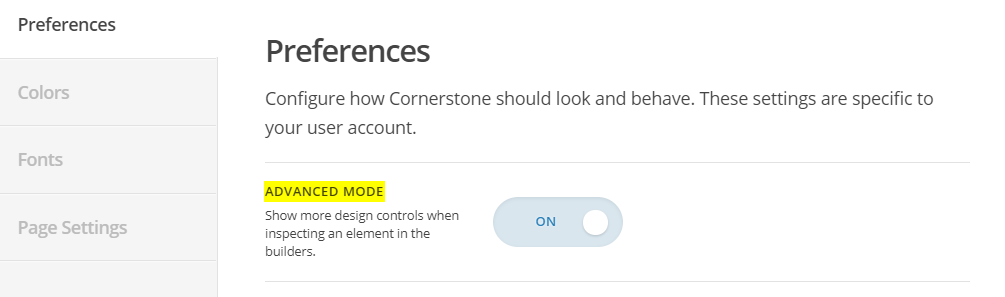
If you want to have the options you mentioned, you will have to enable Advanced Mode. Kindly check the live above for info.

Hope this helps.

Hello, Thanks for responding. We did figure out how to fix our issue. If you don’t mind some feedback, your instructions were a little vague - we suggest that directions be a little bit more step by step instead of large paragraphs for direct steps. In summary, the topics were not clear e.g.: what settings are you referring to? Thanks so much for your response.

Hi again,

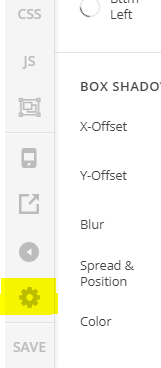
We certainly appreciate your feedback. To enable those options, first click on the gear icon (see screenshot)

Then under Preferences turn on the ADVANCED MODE (see screenshot)

Hope this helps!

This topic was automatically closed 10 days after the last reply. New replies are no longer allowed.