Opening a series of accordion tabs with a series of v2 buttons

I would like to be able to open a series of accordion items using a series of v2 buttons, and to ensure that when one accordion is opened, the others collapse. At the moment, when I assign a class, open_accordion, to each of the buttons, and specify a particular accordion id, e.g. #accordion1, #accordion2, etc. to each button, all accordion open when one of buttons is clicked. This is the js code I am using:

jQuery(function($) {
$(’.x-anchor-button.close_accordion’).on(‘touchend click’, function() {
$(’.x-acc-header’).removeClass(‘x-active’);
$(’.x-acc-item div[role=“tabpanel”]’).addClass(‘x-collapsed’);
});
$(’.x-anchor-button.open_accordion’).on(‘touchend click’, function() {
$(’.x-acc-header’).addClass(‘x-active’);
$(’.x-acc-item div[role=“tabpanel”]’).removeClass(‘x-collapsed’);
});
});

Grateful for your help, please.
Hey Cathal,

It would be more effective if you just simulate a click to the accordion heading. Here’s what to do:

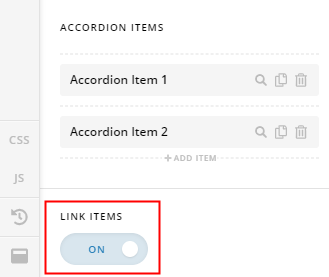
  • Enable Link Items option of the Classic Accordion.

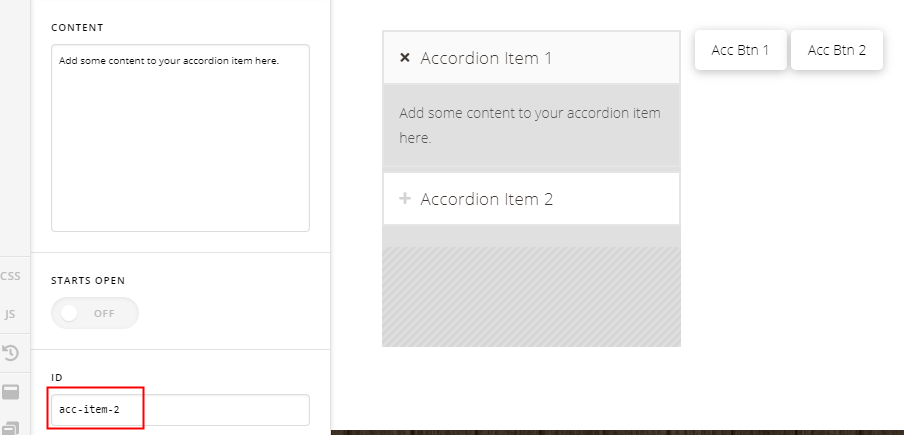
  • Assign an ID to each of the Accordion Items.

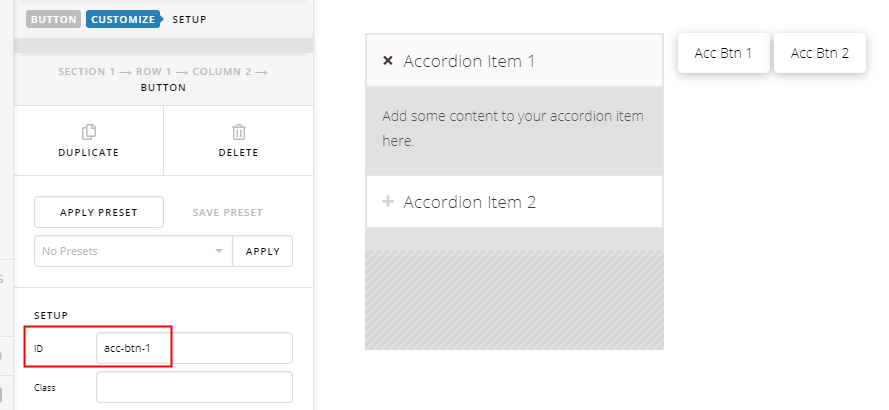
  • Assign an ID to each of the Buttons

  • Here’s a sample code to simulate a click to the Accordion Header.
(function($) {
    $('#acc-btn-1').on('touchend click', function() {
        $('#acc-item-1 .x-accordion-toggle').click();
    });
    $('#acc-btn-2').on('touchend click', function() {
        $('#acc-item-2 .x-accordion-toggle').click();
    });
})(jQuery);

Take a look at the IDs in the screenshot and how they’re used in the code.

Please note that sample codes or any code you find here in the forum are not supported as they’re meant to provide some guidance only to help users get started with extending our products. If they don’t work in your site, you need to consult with a third-party developer.

Hope that helps and thank you for understanding.

Thanks, that works brilliantly!

You are most welcome!

This topic was automatically closed 10 days after the last reply. New replies are no longer allowed.