No idea what the issue is

Hi I just installed X Pro on a new website hosted with domain.com. I have no plugins installed and am unable to edit any pages with Pro. When I try to edit the homepage, I’m seeing the following:
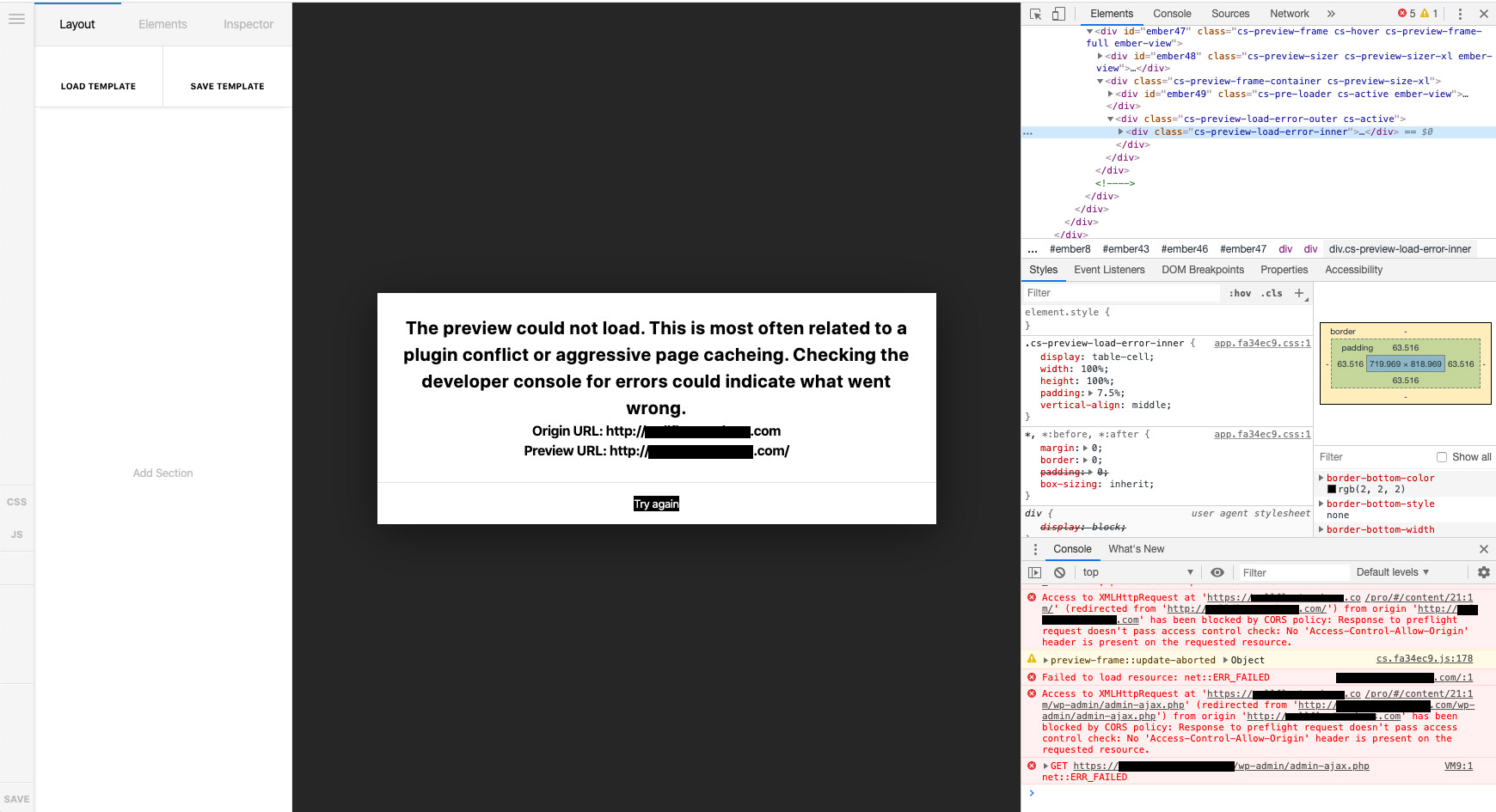
Note that the usual icons on the left side bar are not loading.

I reached out to domain.com and they responded:
the error logs are showing following error:
wellfleetrawbars.com/index.php
PHP Fatal error: Uncaught Error: Wrong parameters for Exception([string $message [, long $code [, Throwable $previous = NULL]]]) in /hermes/bosnaweb28a/b903/dom.sacredsurfschool71947/wordpress/wp-content/themes/pro/cornerstone/includes/classes/models/class-model-content-content.php:91
Stack trace:
_"#0 /hermes/bosnaweb28a/b903/dom.sacredsurfschool71947/wordpress/wp-content/themes/pro/cornerstone/includes/classes/models/class-model-content-content.php(91): Exception->_construct(‘cornerstone’, ‘Unauthorized’)"

The issue does not appears to be with the PHP memory limits. Could you please contact the vendor of the theme ‘pro’ to resolve this error and then try editing the website again using pro theme? If any changes are required from server side, please get back to us with exact requirements so that we can investigate further.

Not sure if this is relevant, but the license was previously used on a different site, which I no longer use and reauthorized on this new site and converted X > XPro. Can you let me know what’s going on? Is this a hosting issue, a theme issue, or something else? How do I fix this?

Hey @BPlug,

Regarding the icon issue. In your screenshot, the error in the console says that CORS is disabled in your web host. They should enable it. See https://enable-cors.org/

Regarding the loading issue, it could be because X and Cornerstone are outdated. Please update X and Cornerstone to the latest version. You can see the latest versions in our Changelog at https://theme.co/changelog.

If your web host is using Mod Security, please ask them to temporarily disable it also just to test if the preview issue will be resolved. If this resolves the issue, please ask your web host to whitelist these directories.

  • example.com/cornerstone-endpoint
  • exampel.com/x

Only if none of that helps, please give us WordPress Admin and FTP access in a Secure Note.

Thanks.

Received this back from domain.com:

The CORS is already enabled on our hosting platform. You may need to update your website’s .htaccess file with below string for it to work:

Header set Access-Control-Allow-Origin “*”

I have updated .htaccess file in folder ‘wordpress’ with the above code and disabled mod _security. Still, the preview is not loading at http://myurl.com/pro/#/content/21 . I would suggest that you check with the theme vendor to investigate this further.

The X and Cornerstone appears like related to the theme ‘Pro’. Please contact the theme vendor to update them.

Hey @BPlug,

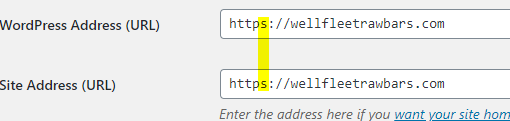
Thanks for providing access. Upon checking, your site is using https but your WordPress and Site URL is still in http.

I’ve set it to https and you can edit your home page in Cornerstone now.

Hope that helps.

This topic was automatically closed 10 days after the last reply. New replies are no longer allowed.