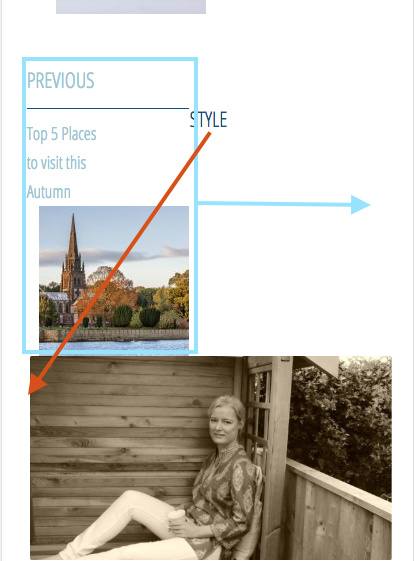
Hi I’ve inserted the following function
function add_entry_navigation(){
if( is_single() || x_is_portfolio_item() ) {
 $next_post = get_next_post();
    $previous_post = get_previous_post();
    the_post_navigation( array(
        'next_text' => '<span class="meta-nav" aria-hidden="true">' . __( 'Next', 'twentyfifteen' ) . '</span> ' .
            '<span class="screen-reader-text">' . __( 'Next post:', 'twentyfifteen' ) . '</span> ' .
            '<span class="post-title">%title</span>' . get_the_post_thumbnail($next_post->ID,'thumbnail'),
        'prev_text' => '<span class="meta-nav" aria-hidden="true">' . __( 'Previous', 'twentyfifteen' ) . '</span> ' .
            '<span class="screen-reader-text">' . __( 'Previous post:', 'twentyfifteen' ) . '</span> ' .
            '<span class="post-title">%title</span>' . get_the_post_thumbnail($previous_post->ID,'thumbnail'),
    ) );
}
}
add_action('x_before_view_global__comments-template', 'add_entry_navigation' );
This creates a div which has a class of nav-links but I can’t get it to clear the divs inside this element, can you help me with this.
This is a link to the post it’s most obvious on https://howtwoseeit.com/gutenburg-test/