[Newbie] How To Create Sub-Nav Bar

I’m new to the X theme and just looking for a little direction.

I am creating a series of static product/service pages for my site and I would like to add a handful of links, or buttons floated to the right that allow the viewer to get more detail on the product. The links would be something like…

Overview | Hardware | Tech Specs | Get A Quote

Any suggestions on how I can accomplish this?

Specs

  • WordPress 4.9.4
  • X 6.0.4
  • X-Child Theme being used

Example Page:
http://champds.com/video/encoder/

Hello @mashby,

Thanks for asking. :slight_smile:

As you are trying to add navigation inside section, please use Cornerstone Navigation Inline element. https://cloudup.com/c7ZRHF7nAaB

Thanks.

Thank you so much! Just what I was looking for.

Follow up question: Where does it source the menu from?

Never mind. I see that it can pull from the WordPress menus area once you create one.

You’re welcome! :slight_smile:

OK, I have a follow-up question regarding what I’m guessing to be the Z-Index for the inline-nav.

All the navigation works with the exception of drop-down items. As you can see in the screenshot below, the Headline appears on top of the menu and none of the drop down items are selectable.

Page: http://champds.com/video/encoder/
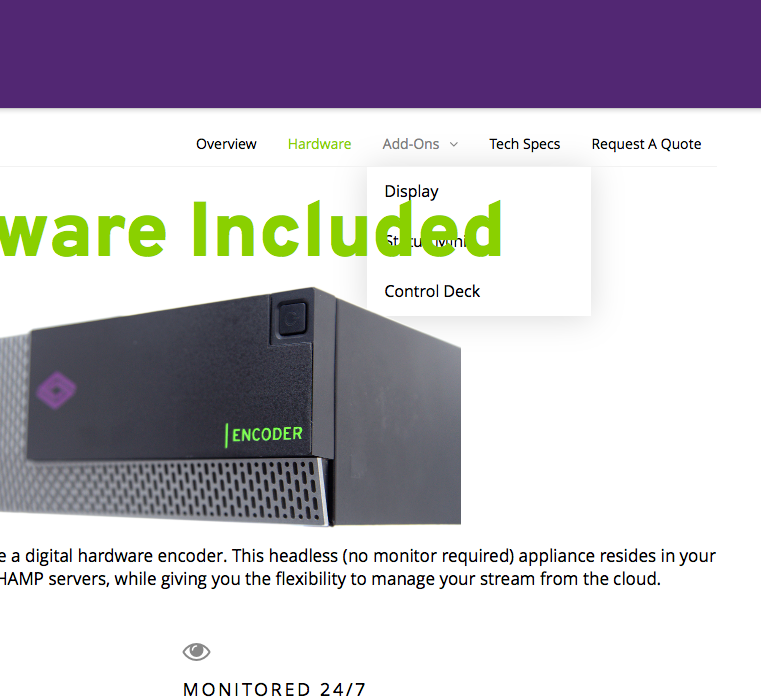
I don’t see anywhere in the inspector where you can set the Z-Index. Suggestions?

Hello @mashby,

Thanks for asking. :slight_smile:

You basically need to change the z-index of section that’s holding navigation. https://cloudup.com/c0B8GRfKLYB

To do that, you need open the section properties by clicking on search icon under layout tab and after that change the values to 10. I have recorded a screencast that you can take a look. https://cloudup.com/cUd2Vb-DAO2

Please let us know how it goes.

Thanks.

That did the trick. Thank you!

You are most welcome. :slight_smile:

This topic was automatically closed 10 days after the last reply. New replies are no longer allowed.