New Theme Update Messed Up Site

The new theme update messed up my site.

The menu/footer are no longer responsive to the original design. I have cleared cache on both CDN and cache plugins, deactivated and reactived plugins, and have checked that theme options demonstrate original theme but site in person does not.

Help would be appreciated for astersbookhour.com

This is the intended design I had prior to the update which I can see in theme options versus what I see on the user site of the website which I have checked on my phone and it shows the same.

The lower two, blue images, are the intended design.

Hi @astersblog,

Thanks for the extra context here. It definitely helps to see the contrast between the current and correct displays.

It looks like your header is using a Global Color, but it isn’t resolving and it’s just falling back to the stack defaults. Would you mind if we logged into your site to take a closer look at why the color isn’t being applied?

If this is ok, you can add login credentials in a secure note.

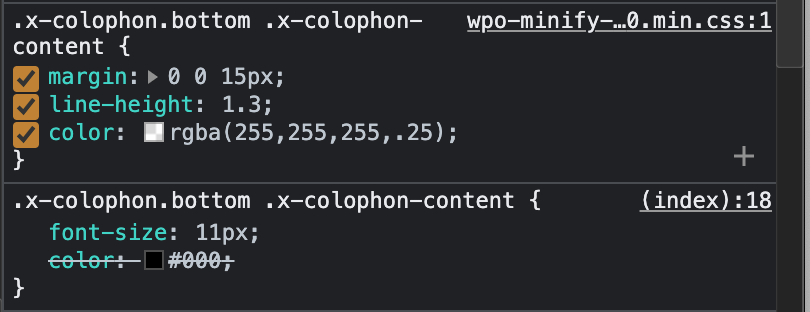
For the footer, I am seeing another problem. This screenshot shows the CSS for your footer text color:
Screen Shot 2021-08-19 at 4.29.12 PM

The partially transparent color is the default footer text color from the Ethos stack base styles. The black color comes from Theme Options.

They are loading in the wrong order - it looks like you have some CSS optimization running, and it is putting the final output in the wrong order.

Could you try disabling that CSS optimizer to see if it gets your footer back to normal? I could also give that a try for you while logged in.

I have attached a secure note above. Thanks.

Can you double check the credentials? It’s saying invalid username/password. Thanks!

I sent another secure note.

Hi @astersblog,

Thanks, I was able to login. I disabled CSS minification in the WP Optimization plugin and everything is working now. The Global colors are working again, and the CSS is loading in the correct order. We can’t really support minification systems like this since they have the potential the rearrange and change the CSS output. The theme expects things to output in a certain order otherwise there can be conflicts.

That being said, X and Cornerstone CSS is already minified so it isn’t going to be much of a performance gain to run it through another optimization process.

1 Like

This topic was automatically closed 10 days after the last reply. New replies are no longer allowed.