New Bugs with Essential Grid

Hi there,

I have noticed a strange bug with Essential grid.

The site uses a lot of Essential Grids, and I have noticed that a couple of grids that were set up a while ago, that use Custom content as the grid source, when I go in there now, no custom content is showing … yet it must still be there in the code because the front end is still fine. So this is an issue because I cannot edit these grids. (I noticed the issue because I want to change the number of columns that are showing on mobile, and when I go to do that it says “Please choose at least one item for the custom grid”, and because I can’t do this it won’t save.

The other strange thing, which seems related, is another grid that is also a Custom content as the Grid source, also uses Custom Skin per item. So for each item in the grid we have a different rollover image that is used, this was also set up a while ago and it uses Custom Skin to achieve this. What is strange is that when I go into the editor, the custom skin that was set a long time ago no longer shows up, it is like it is not there, However it IS still there in the code, because it works fine in the front end, the hover images still work.

Yes, I have refreshed the preview in Essential grid.

My first thought was that this would be just a plugin update issue, but there is no update available at the moment for Essential grid.

Are you aware of this issue? Can you pls follow this up with Essential Grid people?

I will send site details in private post so you can check it out for yourself, it’s definitely a strange bug, the way it still all works fine front end but important settings missing in the backend!

Thx.
Hi @kirk74,

Since you did already basic troubleshooting, please share credentials so we can check the setup you’re having. Since you are using a lot of Essential Grids, please do also share the specific grid with issue for ease of checking. Thank you.

Hello, yes I did share these in Secure note, can you see them? Thx.

Hi @kirk74,

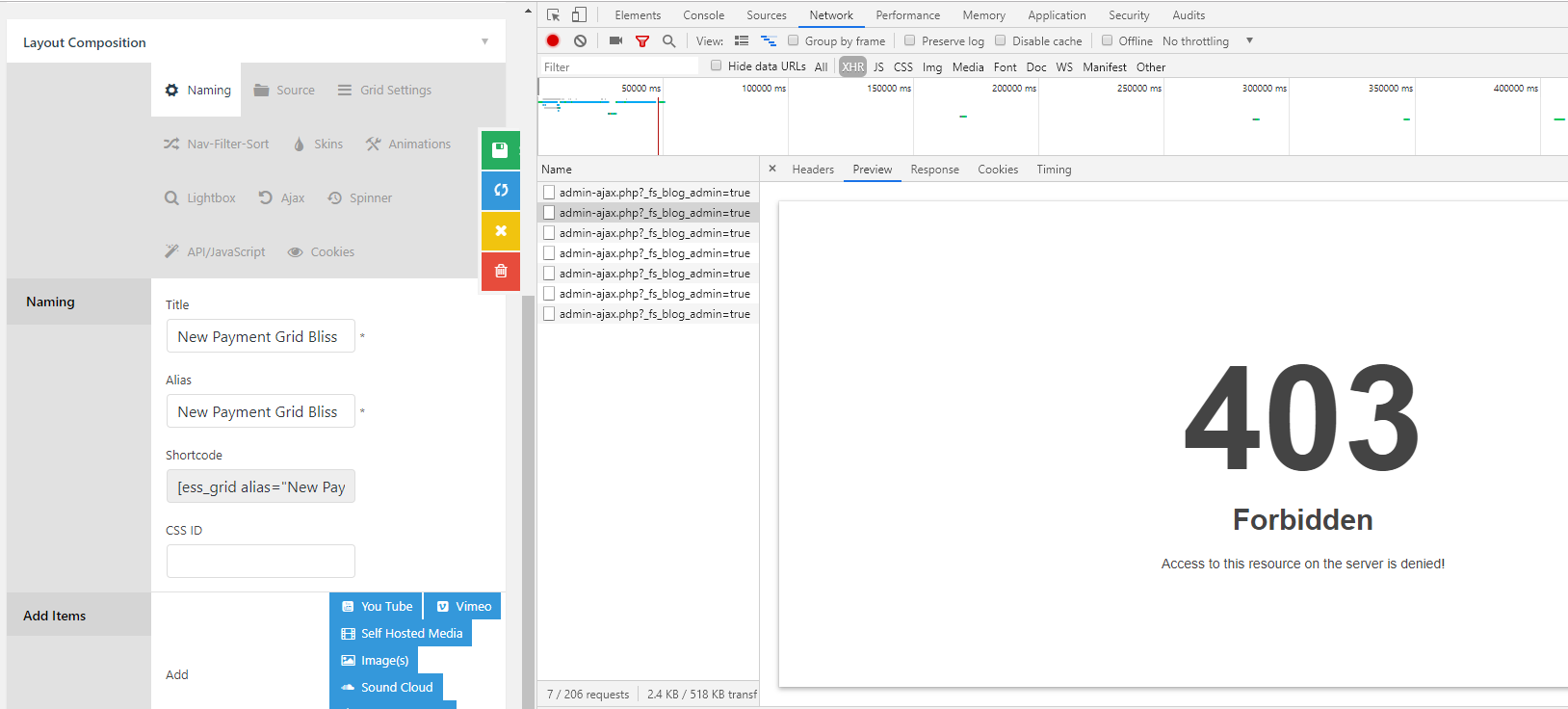
It’s not a bug but hosting or plugin confflict related in which blocks specific request. The ajax request contains ?_fs_blog_admin=true in which trigger the 403 error (forbidden). And your site is kind of very slow, there could be many causes like other plugins or host environment.

I also checked Essential Grid and it doesn’t use _fs_blog_admin on AJAX parameter.

You could try testing for a plugin conflict. You can do this by deactivating all third party plugins, and seeing if the problem remains. If it’s fixed, you’ll know a plugin caused the problem, and you can narrow down which one by reactivating them one at a time.

The 403 error is usually security related issue and I recommend contacting your hosting provider, see if they can unblock that AJAX request.

Let us know how it goes!

Hi, Thanks for your reply . I have a dev version of that site, and I deactivated all the plugins except for Essential Grid, and unfortunately same issue so it is not a plugin conflict.

I can try asking web host tp allow access to that ajax file, but it is still really strange that this is haooening now when these grids were created a long while ago and this issue s new… and also the fact that they look and behave fine still in front end.

Thx, Kirstie

Hello @kirk74,

Thanks for updating the thread.

It’s asking for site login details and above credentials are not working. At this moment I would suggest you to get in touch with the hosting provider and check for unblocking AJAX request as suggested by my colleague in previous reply.

Thanks.

Thank you, I have contacted host, will update.

You are most welcome!

OK so it is not a permissions issue, it is an issue with a call within that php file itself, so I will need you to ask Essential grid to look into this please. This is from our host:

That file is OK on the filesystem. Has permissions of 644 like everything else. You can access the file directly and get a response code and not a 403 forbidden.

So the problem is related to a called function inside admin-ajax.php and whatever it is doing.

Thx.

Hi @kirk74,

Would you mind sharing the following access on dev:

We like to test more to see the root cause of the issue or to find more details. It would be better is we can test on dev site.
For the mean time, can you try the following on dev site and then send us the result.

1.) When you said you can’t edit, we’re not sure of the extent. Yes, preview is missing but if skin and other settings can be change. If yes, please try it on dev site. Duplicate the grid with issue and then try using a different skin. Let’s just see if this is specific to setting. Or the issue is cause by the content. Thank you.

thanks so much . will add this to secure note and do the test you asked for.

Hi @kirk74,

This is not a file permission issue but security related issue which triggers 403. The admin-ajax.php is a global file used by Wordpress and it works pretty well on other parts of the site. It just that there is a certain request that contains unwanted content sent through ajax and it’s blocked by your hosting provider. It’s not the file that is being blocked, it’s the certain request. This blocking is not coding related so it can’t be fixed by any code and you can’t bypass it once it’s blocked by your host security.

I have only suggested the plugin conflict test in case one of them is feeding the unwanted content to the request. So yes, it’s not the admin-ajax.php issue, it’s the request issue and whichever the content it has. The best way is contacting your hosting provider or someone who’s familiar with your hosting environment, which who could retrieve the details of what is being blocked, again this not file permission related.

And even if your site is old and remains untouched for a long time, but they changed some policies or security standard then it will still be affected.

Thanks!

This topic was automatically closed 10 days after the last reply. New replies are no longer allowed.