Need urgent Help, website stopped working

Hello,

I have been working on my website, and wanted to edit woocommerce direct checkout procedure.

I came across this article: http://www.remicorson.com/woocommerce-skip-product-cart-pages/

So i followed up the steps, and downloaded child PRO theme to insert the code in function.php

But once I did enter the code, my whole website became inaccessible. wp-admin stopped working, all i can see is this message:

Parse error: syntax error, unexpected ‘<’ in /home1/hazlive/public_html/wp-content/themes/pro-child/functions.php on line 26
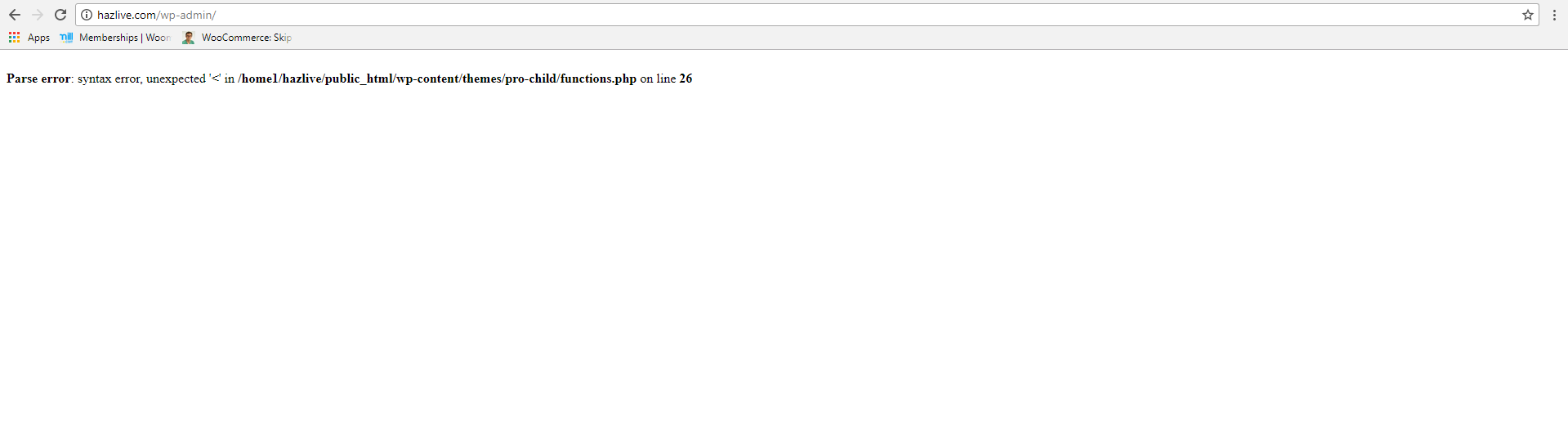
Can you help me write the code in correct syntax, or get rid of it?

Hope to hear from you soon,

I guess I entered the code incorrectly, maybe <?php caused the problem?

Hope you can help me ASAP

Hello There,

Thanks for writing in! This usually caused by invalid php code. I have logged in using the ftp credentials and it seems that the credentials is for a different directory. This is the only contents:

Please double check it so that we can resolve this issue. Or maybe you can post the contents of your child theme’s functions.php in your next reply.

Regards.

Very sorry for providing wrong FTP credentials, I have attached the correct one in secure note.

Hello There,

Thanks for providing the information. We have logged in and edited the functions.php file. We uploaded it again and still nothing happens. I assumed that we must be in the wrong directory. If you can access it, please change the contents of the file and make use of this code instead:

<?php

// =============================================================================
// FUNCTIONS.PHP
// -----------------------------------------------------------------------------
// Overwrite or add your own custom functions to Pro in this file.
// =============================================================================

// =============================================================================
// TABLE OF CONTENTS
// -----------------------------------------------------------------------------
//   01. Enqueue Parent Stylesheet
//   02. Additional Functions
// =============================================================================

// Enqueue Parent Stylesheet
// =============================================================================

add_filter( 'x_enqueue_parent_stylesheet', '__return_true' );


// Additional Functions
// =============================================================================


add_filter ('woocommerce_add_to_cart_redirect', 'woo_redirect_to_checkout');
function woo_redirect_to_checkout() {
        $checkout_url = WC()->cart->get_checkout_url();
	return $checkout_url;
}

Hope this helps. Please let us know how it goes.

Hello,

I checked the website and wp-admin, and it is working again! It worked! Thank you so much!

I hope to get suport with my other issue https://theme.co/apex/forum/t/woocommerce-direct-checkout-page/3905 now that my website is working,

Thank you!

Hi there,

Glad to be of a help. The ticket will be answered in proper time frame regarding the thread’s queue.

Thank you.

1 Like