I managed to get the line across the screen clear but I am really trying to figure out how to remove it entirely and just have the words on the right still showing.
my website - dbahsee.website
Hi @dbahsee,
Thanks for reaching out.
I checked and there are lines, but I’m not sure which title lines. Would you mind providing a screenshot? As I no longer see lines from the titles.
Thanks!

im referring to the strip at the top of the Ethos stack where the home portfolio and account are shown. I really want to leave the words but no framing around it at all , and hoping to replicate it on the account page as well . But main concern for right now is the main page
dbahsee.website
@rad
Hi @dbahsee,
Ah, the menu items, you can change that through your menu elements setting. Please check this screenshot,
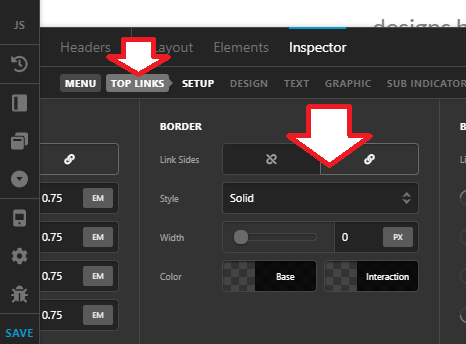
Depending on Link Sides option, you’ll have to set the width to 0 and color to transparent.
Thanks!
Yeah i tried your instructions and the framing is still there, what can i be missing. I am working on this in the header editor under pro .

Hello @dbahsee,
It is coming from the box shadow in the bar settings. Please set it to 0 and the box shadow color to transparent.
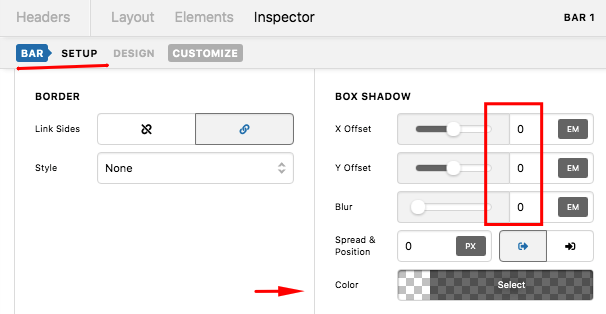
We would love to know if this has worked for you. Thank you.
This topic was automatically closed 10 days after the last reply. New replies are no longer allowed.