Need Support to apply content box CSS

Hi,

I followed the instructions of the following article : http://bit.ly/2DNHPqQ

in order to bring the text background box to my content,

I’ve made adjustment adding CSS code to both themes’ style.css (Child theme & X theme),

but it still seems no luck to see the box come up on my content.

Plz tune in to give me some support!

Hi,

I can see that you already added the CSS but I think you missed to put the classes of the section or element.

If you want to put the text background in your paragraph then need to add a CLASS to the <p> tag.
Like this.

<p class="content-box-blue">Để giảm thiểu thương vong, tôn trọng và tử tế là hai yếu tố bắt buộc. Một cái nhìn thành khẩn cùng một ngữ điệu tôn trọng là đủ để thể hiện thông điệp một cách lành mạnh. Sự nhất quán trong giao tiếp cũng góp phần thuyết phục người nghe.</p>

If you want to put the background in a whole section then you need to add a CLASS to that section. You can do that by going to the section and click customize, under there you can add a class to it.
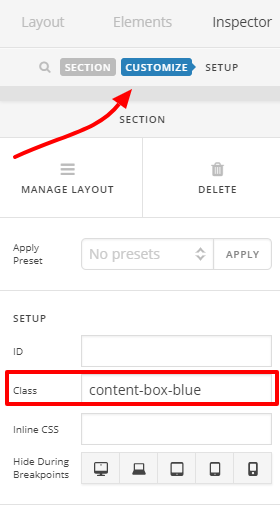
Hope that helps.

Thanks.
1 Like

In addition, I’d like to make the left edge of the box thicker, how can I?

it looks like this:

Hi There,

You need to specify a border-left on your box CSS styling:

e.g.

.content-box-yellow {
    background-color: #fef5c4;
    border: 1px solid #fadf98;
    border-left: 5px solid yellow;
}

Have you seen the Alert element or Alert shortcode, that’s seems to be the same box as what you’re trying to do?

Thanks,

1 Like

This topic was automatically closed 10 days after the last reply. New replies are no longer allowed.