Need help with my new blog

Hi,

I bought X theme and installed on my website. I did everything right but found that the
blog posts on the homepage are not of the same height.

Can somebody tell me the solution so that latest post columns
can be of same height. Here are details to my site

URL: https://www.daymantra.com/
Version of X theme: (non pro)

Awaiting response

Thanks
Hi Pankaj,

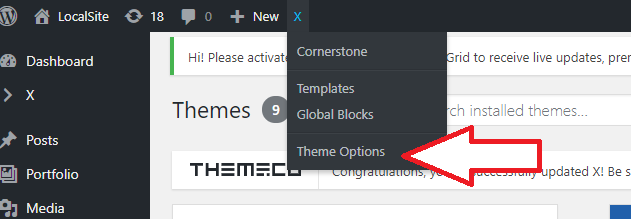
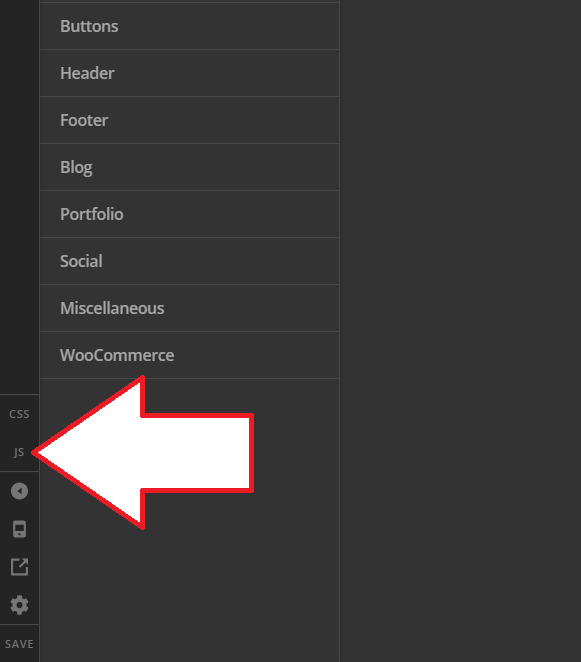
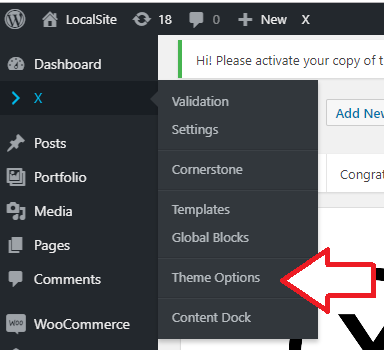
Thank you for reaching out to us. Try adding the following code in the Theme Options > JS:

jQuery(document).ready(function($) {
	var max = 0;
	$(".blog .x-iso-container article").each(function(index, el) {
		if( $(this).find('.entry-wrap').height() > max ){
			max = $(this).find('.entry-wrap').height();
		}
	});
	$(".blog .x-iso-container article .entry-wrap").css('height', max + 50);
	setTimeout(function(){ $(window).resize(); }, 100);
});

Don’t forget to clear all caches including your browser’s cache after adding the code. Let us know how this goes!

Hi Nabeel,

Thanks for your response.
I got it and pasted this code.

But found that we are slightly off,not matching on the same column edge.

Can you have a look please

Thanks
Pankaj

Hi Pankaj,

Sure, please check these screenshots.

or

Then

Thanks!

Thanks Rad, Done it but if you look at the page its still slightly off.

The right side of columns are not matching exactly with the lower edge of left columns,

Can you suggest any more tweaks so that these are exactly inline.

Hi Pankaj,

Please try changing it to this

jQuery(document).ready(function($) {
	var max = 0;
	$(".blog .x-iso-container article").each(function(index, el) {
		if( $(this).find('.entry-wrap').height() > max ){
			max = $(this).find('.entry-wrap').height();
		}
	});
	$(".blog .x-iso-container article .entry-wrap").css('min-height', max + 50);
	setTimeout(function(){ $(window).resize(); }, 100);
});

But it shouldn’t be done that way since it’s a masonry layout and that’s how masonry layout works.

Thanks!

Hi Rad,

Thanks,tried it but seems like this code is not making any changes.
It seems to be similar code that I got earlier.

Can we modify it to get what I like to design.

Thanks

Hi Pankaj,

The previous one use height, the new one uses min-height. Unfortunately, it will only change the height but not the design and we can’t provide custom development in the forum.

Another solution would be adding excerpt manually, and make sure the excerpt has almost the same length so they will appear equal. Please check this for manual excerpt http://buildwpyourself.com/wordpress-manual-excerpts-more-tag/

Thanks!

Thanks!

This topic was automatically closed 10 days after the last reply. New replies are no longer allowed.