Need help on following pointers

Hi,

I have bought X theme and I am using it to develop my site which is still in a very primary stage - https://www.atripdiary.com/

I would like your help on following pointers

  1. Clicking on any item in the menu takes me to the page where the heading is [Below you’ll find a list of all posts that have been categorized as “EAT”] - Please help me to remove this heading and replace it with a custom heading

  1. The default background of all the pages is a grey one. I have to change it to plain white background. I have tried few steps mentioned in other posts in the forum but I am unable to change it. Please help

  2. As you can see, the bread crumb is half hidden below the menu and it is cut, please help me to fix it
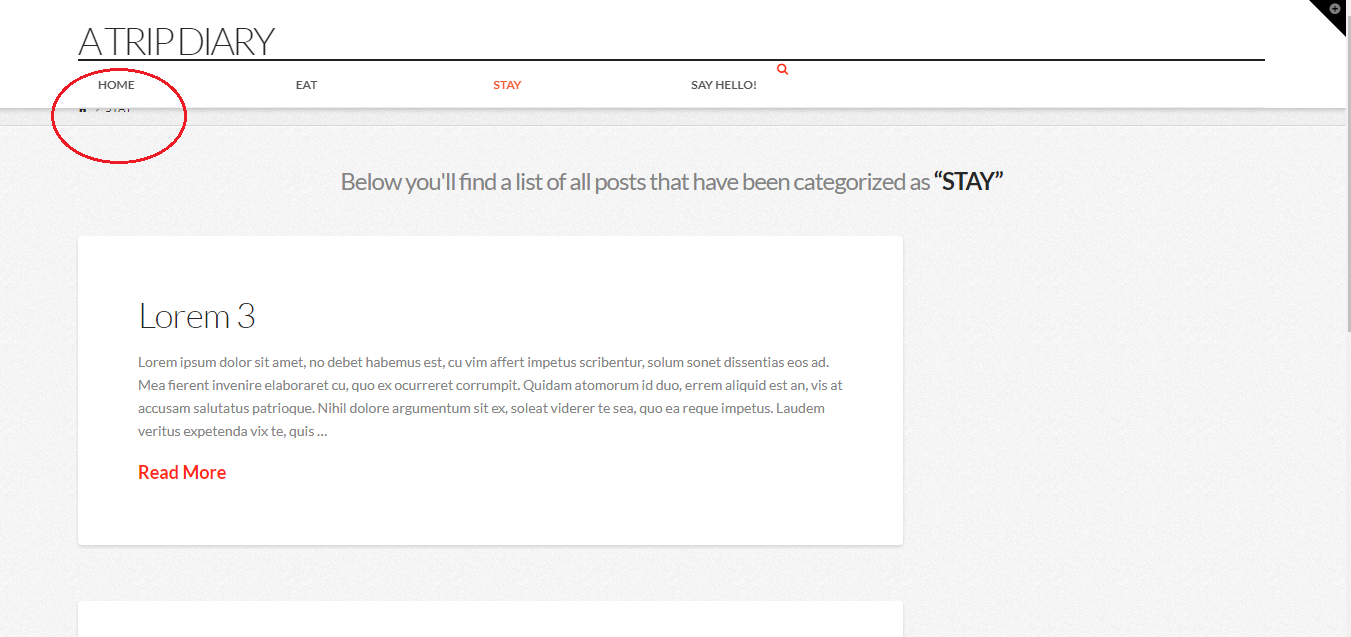
  3. As you can see in the below screenshot and on the website too if you visit it, the search icon is very small and misaligned. Ideally I would love to have the search icon in line with the other items in menu (home, etc) Please help !
OK, few cup of coffee and some more google helped me sort all these issues. Funny I never found these posts when I was looking for it earlier. Maybe I didn’t looked for it hard enough

Thank you for solving it in previous posts and thanks to the contributors apart from the staff who have solved it in posts too. The issues are resolved !!! :smiley:

Hi @trip_diary,

Happy to hear that.

Feel free to ask us again.

If it is okay to you, please share us the link of the answers you found so that if other will see this thread they could easily find answers.

Thank you so much.

Sure Nico, the solution I found was -

  1. Remove category heading from every page - to do it, add this in the custom css

.category .x-header-landmark {
display: none;
}

I have still not figured out how to replace it with a custom heading for each category page :tired_face: :disappointed:

  1. To change the background of whole site to plain white, I have added this custom css I found in one post
    body .site {
    background-color: #fafafa;
    }

  2. To show the bread crumb which is hidden below menu - follow this path

Appearance > Customize > header > navbar top logo allignment (here change the number till you get the desired positioning)

or to completely remove bread crumb as i did -
Appearance > Customize > header > Miscellaneous (turn it off from here)

  1. For aligning the search icon as i did on my site www.atripdiary.com add this custom css

.menu-item.x-menu-item.x-menu-item-search { float: right; margin-top: 15px; }

Please let me know how can I replace the heading of each category page with a custom heading :slight_smile:

Hi There,

Do you mean title of the category page?
Go to Post > Categories : Edit Specific category and then edit the Archive Title & Archive Subtitle,

Hope this helps.