Need help controling blog width on Integrity Band

Blog posts formatting is controlled by this class on Integrity Band

.blog .entry-wrap, .single .entry-wrap {
margin-left: auto;
margin-right: auto;
max-width: 600px;
text-align: center;
background-color: #dfd9c3;
}

I would like to turn off text-align center and max-width but I cannot figure out where this class is defined so that i can modify it (or at least keep it from being applied to blog).

Page link in question is:
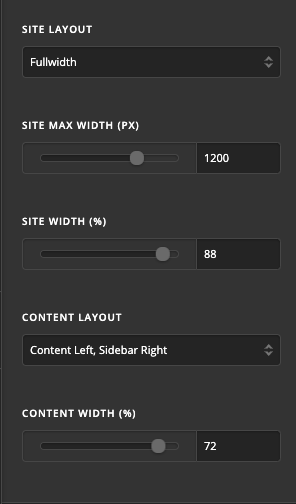
Hi @TragicWarrior,

Please kindly go to X > Theme Options > Layout and Design and set the Maximum width and other layout options there:

If you are interested in having another maximum width only for the blog single pages, then kindly go to X/Pro > Theme Options > CSS (CSS icon is in the left section of the screen) and add the code below:

body.single.single-post .entry-wrap {
    max-width: 1200px;
}

Feel free to change 1200 to whatever size you like.

Thank you.

Found it. Thanks!

Glad that we could be of help :slightly_smiling_face:.

This topic was automatically closed 10 days after the last reply. New replies are no longer allowed.