Hello Community,
I can not find any Navline this dropdown menu for the Phone , please someone can help me and show how it works. Thank you
best regards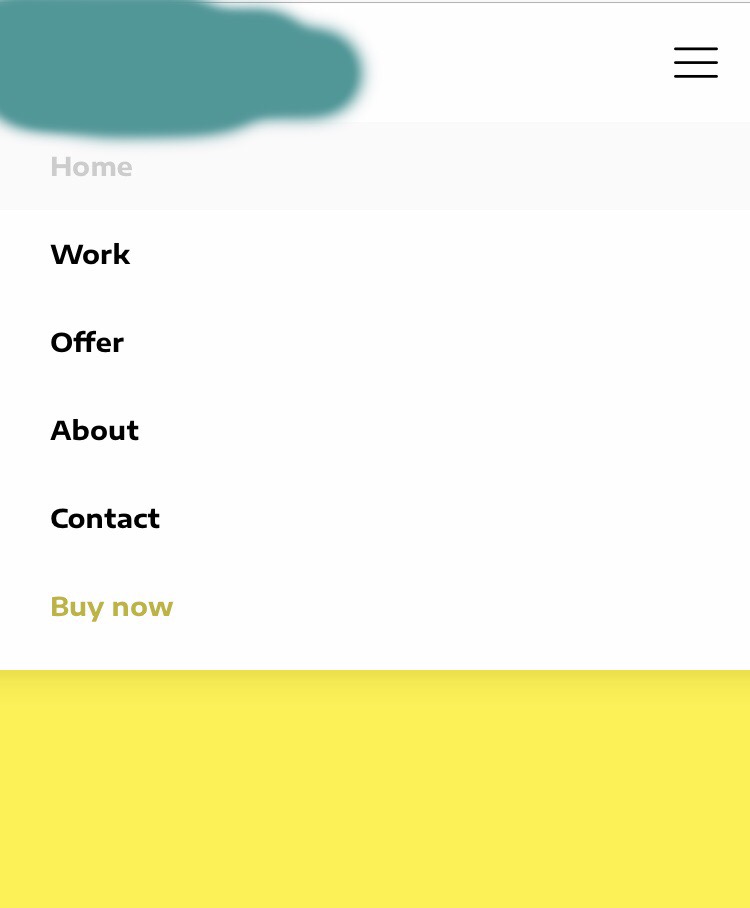
Hello Community,
I can not find any Navline this dropdown menu for the Phone , please someone can help me and show how it works. Thank you
best regards
Hi Nico,
Thanks for writing in!
I checked your site that has been added to your license and the mobile menu works as expected.
The menu doesn’t have submenu item.
Can you please confirm if you are talking about any other website. If so please send us the URL so that we can have a look and give you a proper solution.
Thanks
Yes my dropdown menu works as expected, I would like to have the dropdown menu as on the photo on my homepage.
So I meant that 
Hello Nico,
Thanks for updating the thread.
As you are using Pro Theme Header builder having a navigation menu similar to the screenshot you have shared will require some custom development work. However, the closest one that you can take a look is Navigation Dropdown element.

Thanks.
Thank you !
I’ve already seen the navigation dropdown, but how can I edit it to work as it does in the photo above?
Hi Nico,
That could be an X theme menu which is different from the menu provided as elements in pro builder. How about navigation layer or navigation collapsed? It’s more like mobile menu than a dropdown.
Thanks!
Rad I do not know, I saw the menu on one page and I just wanted the drop down menu on my side. the question is whether it is possible with theme x pro replicate something and how?
Thank you for the fast Support
Hello @NicoMaier,
Thanks for updating in! The navigation in your image is the default mobile navigation of the X theme and the Pro theme. Since you are using Pro, you can use the same menu only if you do not have a custom header. Now if you have created a custom header for your site, you only option is to use the navigation dropdown element. You can hide the navigation dropdown in larger screens and show it in mobile screens by utilizing the “Hide During Breakpoint” option which can be found in the navigation dropdown element settings. To know more about this option, please check this out: https://theme.co/t/hide-during-breakpoint-explained/17378
Hope this helps.
This topic was automatically closed 10 days after the last reply. New replies are no longer allowed.