Navigation menu problems and footer problems after updating to X 9.0.8 and Cornerstone 6.0.8

After installing X 9.0.8 and Cornerstone 6.0.8 on pinerysouth.com/staging, there are formatting/display issues with both the navigation menu and the footer. On desktop, the navigation menu does not display at all. On mobile, the expanded navigation menu is just an unformatted list. On both desktop and mobile, the footer is incorrectly formatted. I am using the Ethos stack. Changing to the Icon stack fixes most of the formatting/display problems, but that is only a temporary work-around since I do not care for the styling of the navigation links in that stack. I have already cleared the cache, and that did not help. I am attaching screenshots of each of these problems preceded by a screenshot from the production site (pinerysouth.com) where the updates are not installed.

Thanks,
Darlene Cain

Mobile navigation menu unformatted

Hello Darlene,

Thanks for writing in!

I have checked your staging site and I can see that you are using the Ethos stack the same as the production site. The header and footer issues seem resolved already too. Please check out this screenshot:

You maybe having some caching issues. After doing the updates, always remember to clear all caches (if you are using WP Rocket, WP SuperCache or W3 Total Cache) when updating so that the code from the latest release is always in use. This will help you to avoid any potential errors.

And please clear your browser cache too. You may use private browsing mode in testing your site to make sure that you are viewing the latest codes from the updates and not the cached version in your browser.

Kindly let us know how it goes.

Clearing Chrome’s browser cache fixed these problems. I had previously cleared the cache but not the browser cache. Thanks for the tip. Also thanks for the suggestion to use private browsing mode. I’ll make that part of my process.

The only problem I see now is that the hamburger button is too large and vertically misaligned. See the screenshots below. Thanks again for your help!


Hello Darlene,

It seems that the hamburger menu styles are still rendering from the cache. I would suggest you clear the cache and then check it again or for the quick fix you can use this custom CSS code

@media (max-width:961.99px){
.x-btn-navbar, .x-btn-navbar.collapsed {
    font-size: 24px;
    margin-top: 0;
}
}  

Please note that the code provided above serves as a guide only and it would ultimately be your responsibility to take it from here. If you are unfamiliar with code and resolving potential conflicts, you may opt-in on our One service for further assistance.

Thanks

The large, misaligned hamburger button persists even after clearing the cache and viewing the site in private browsing mode (Chrome Incognito mode), indicating that the problem is not due to caching but the theme code. Please forward this problem to the theme developers. I could use custom code as a “quick fix”, but that would not help other users of the theme who are encountering this problem.

Thanks,
Darlene Cain

Hello Darlene,

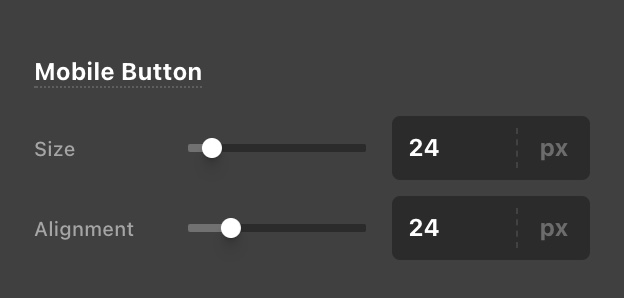
Actually, this is not an issue. It seems that on your site, if you go to Cornerstone > Theme Options > Headers > Mobile Button, the “Size” value is set to 40px. You should change that to 24 pixels only to make the mobile button a lot smaller.

Screen Shot 2021-09-12 at 8.26.13 AM

Kindly let us know how it goes.

Of course, I could change the setting to make the mobile button smaller. Why did a theme update make the button larger, though? It seems like a small problem with the theme code.

Hello Darlene,

It could be your previous setting or that the Theme Options default 24 pixel value was not able to override your previous Theme Options settings.

Best Regards.

This topic was automatically closed 10 days after the last reply. New replies are no longer allowed.