Navigation Inline Edit - Customize one Navigation link only

Hi there,

I want to add a border-radius/background on only one element of my Navigation bar.

Please see attached what I want to achieve > edited in the developer console to give you the visual.
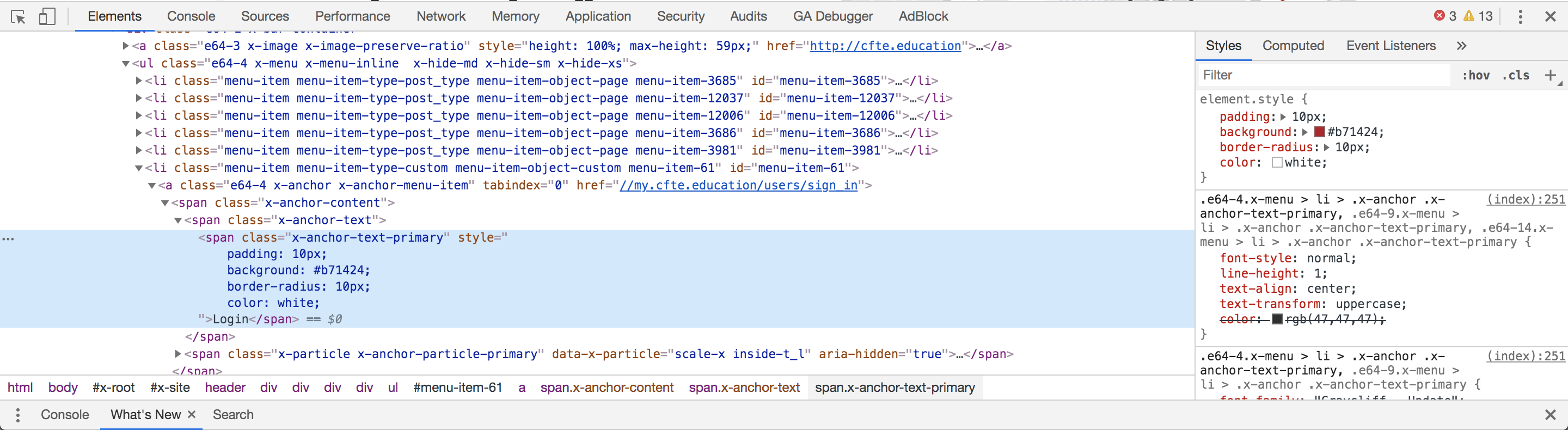
Also one quesiton in relation to the navbar > how do I make my sticky scrollbar show a different navbar on scroll for example when users scroll past the above the fold section I want the navbar to simplify and only show two call to actions.

Thank you

Hi Filip,

Thanks for writing in.

Try adding this css below. It only targets the menu item the has a href that contains sign-in.

.menu-item a[href*="sign_in"] .x-anchor-text-primary {
    padding: 10px;
    background: red;
    color: #fff !important;
    border-radius: 15px;
}

In order to do this, you need to have 2 bars, the first one should be the one that stays at the top and is not sticky. The second one will be the one that’s sticky and is initially hidden and will only be viewed once the user scrolls down. Here’s a screenshot of the 2nd bar’s setup.

Hope it helps.

Thanks for that.

How do I change what options are shown in my navbar when it switches to the second bar?

I want to remove some options and only show explore courses, for corporate and login

Hello Filip,

To resolve your issue, please go to Appearance > Menu and create two sets of the menu.
One menu is for your first bar and the other menu containing only the “show explore courses, for corporate and login” will be for your second bar.

Hope this makes sense.

This topic was automatically closed 10 days after the last reply. New replies are no longer allowed.