Navigation Inline Dropdown not working

I have a dropdown navigation menu in my side header, i have added sub items and the dropdown arrow shows but when i click on it or hover nothing drops down, it just takes me to a list of the posts that are under the main item. Is there any reason why it’s not dropping down?

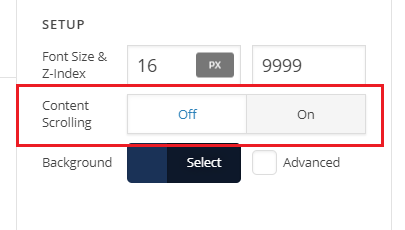
My content scrolling in the bar is turned off.
Hi Jane,

Thank you for reaching out to us. I checked your setup and the Bar’s Content Scrolling option was enabled. I went ahead and turned it off. Please note that It is not applicable if you have submenu in your navigation.

Dropdown menu is working fine now. Cheers!

wow haha im sorry i thought i had turned it off… duh

thank you though!

is there any way to keep content scrolling on and have the dropdown menu work? we have a lot of items and it cuts off on smaller screens. Also is there a way to make the dropdown go below the topic and stay in the sidebar? So you would click on the topic and it would take you to the page, then the dropdown would come down below it and stay there until they clicked the arrow to make it go away again.

Hi Jane,

Unfortunately, that is not possible. I advise is to turn on the left Bar’s Content Scrolling, and add all your menu items as parent menu (no submenu)

Thanks,

Sorry just wanted to check because I wasn’t sure if you meant everything was impossible, is there a way to make the drop down drop DOWN as opposed to out to the side? and for it to be sticky?

Hello Jane,

Because the dropdown will display on the side by default, you can only display it downward by adding a custom css. please add the following CSS code in the X > Theme Options > Global CSS (http://prntscr.com/evui3r)

.sub-menu.x-dropdown {
    position: relative;
    top: auto;
    left: 0;
    height: auto;
    display: none;
}


.sub-menu.x-dropdown.x-active {
    display: block;
}

We would love to know if this has worked for you. Thank you.

That worked great! Thanks heaps! I really appreciate all your guys help :slight_smile:

You’re welcome!
It’s really good to know that it has worked for you.

This topic was automatically closed 10 days after the last reply. New replies are no longer allowed.