Navigation Inline - dropdown element can't be centered

Hi there,

We’ve been trying to center the dropdown on the Navigation inline element, but it’s always going to the left or right based on the screen size. We’ve since added different variations to its setting, depending on the screen size, but we’re wondering what we can do to keep the amount of buttons minimal and to just have the dropdown area appear centered regardless of the screen size.

You can see an example of the navigation here: https://getboober.com/
It’s the red pill buttons that say “GET HELP NOW”, which appears close to the top of the page and is also located twice lower down the page (where the problem is more apparent as well).

Thank you in advance.
Hi @INcroatia,

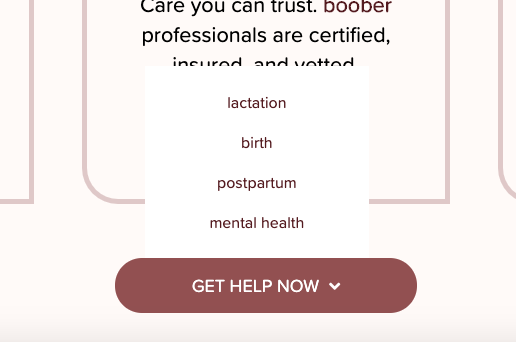
Unfortunately, there is no way to center the dropdown as it is coded to automatically be left or right-aligned depending the screen size and amount of space available. The feature is a Javascript hardcoded in the theme files.

You will need custom Javascript coding to override the feature and that is outside of our support scope and you need to hire a developer to implement the functionality.

The dropdown even opens up upward if there is not enough space below the button:

Screen Shot 2020-04-01 at 11.41.42

Alternativey, you can consider using the Off-Canvas or Modal elements.

Thank you for your understanding.

This topic was automatically closed 10 days after the last reply. New replies are no longer allowed.