Navigation Collapse not collapsing

Hi

I would like to use you navigational options within cornerstone Modal, collapsed layered etc, because you can assign to individual pages correct vs using Superfly? However, when I add the nav collapse it shows open with no collapse option. Where do I set these parameters?

http://www.getawesomebranding.com/video-playlists/

Thanks!
Christina
Hi Christina,

Navigation collapse should have a button and if clicked it opens up the menu.

I was able to replicate this issue in my test site.

I will forward this to our web development team for review.

Thanks

Same deal with Nav Layered: https://www.screencast.com/t/wZ0DTYS8i0y

How can I add a label to menu? https://www.screencast.com/t/aK1TNS8KAq

Thanks!

Hi Christina,

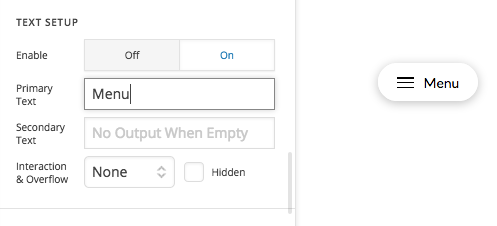
If you’re using Navigation Dropdown element. You can customize it accordingly as well. For example to add a label text to your menu, by head over to Text tab.

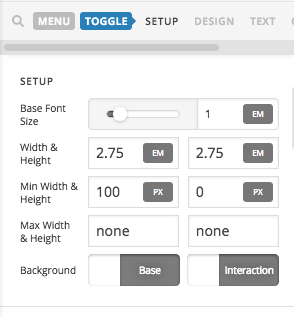
Then you can go to Toggle tab and set a minimum width.

Likewise you can use those options to customize.

Hope that helps.
Thanks!

Thank you. I appreciate it the tip. How do I get it from circle to like you have as right now the text is hidden in circle:

Hey @Christina,

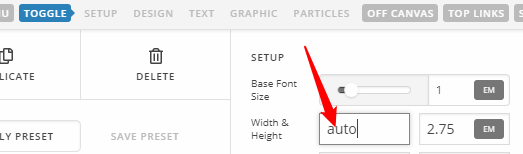
The Toggle’s Width must be set to auto

Hope that helps.

Thank you! Perfect.

Christina

You are most welcome. :slight_smile:

This topic was automatically closed 10 days after the last reply. New replies are no longer allowed.