Hi. Currently, my navbar logo (renew stack) is aligned like this:

I would like to have the logo vertically aligned with the menu items. How do I do that?
Hi. Currently, my navbar logo (renew stack) is aligned like this:
I would like to have the logo vertically aligned with the menu items. How do I do that?
Hi There,
Thanks for writing in!
You can adjust the nav menu height to match the vertical alignment of the logo.
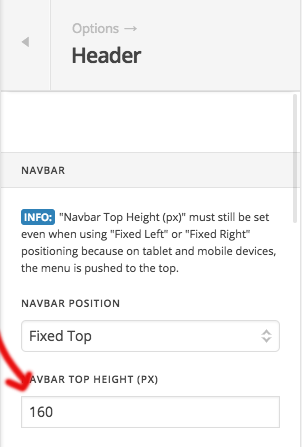
Hope that helps!
Thank you. I made that adjustment. I would like to tweak it a little and move my menu items down a little (more vertically aligned). How can I adjust that?

Hello @HGPower,
Thanks for updating thread. 
You can bring down menus from X > Theme Options > Header > Link Alignment > Navbar Top Link Alignment. https://cl.ly/1D041n2r1h2k
Thanks.
Thank you!
You are most welcome.
This topic was automatically closed 10 days after the last reply. New replies are no longer allowed.