Navbar and Password page

Hi there,
Please help me with this… I have a very tight submenu, so I have not space between the menu and the submenu, even when the submenu open not possible to access to the main item.

On the other hand, I need to know how to change the options for the password option page…

Hi @joserodrigz,

You can change the space between subitems by adding the CSS code below to X > Theme Options > CSS:

.desktop .sub-menu a {
    line-height: 2.4
}

Feel free to change 2.4 to whatever size you see fit with your design.

I did not understand the second question. Would you please kindly get back to us with more detailed information on the second question and maybe a screenshot to know the details in a new thread?

Kindly open up new threads for additional questions as it will help us to focus on each issue and give you better support which you deserve. Maintaining a long thread is harder and also it will be harder for the other customers to find the correct information if they have similar issues. You are always welcomed to reply to this thread to follow up on the same question.

Thank you

Tks !
Not working the code… nothing happens.

The second question is already solved.
Tks again

Hi Jose,

I’m checking the sub-menu and the main menu and I’m not sure what’s the issue. They are accessible from my view, would you mind providing clarification about the issue? A video recording will be helpful.

I also tried the above CSS and it works, I’m just not sure of what’s really the issue.

Thanks!

Hi,
No space between the main topic and the submenu

Hi @joserodrigz,

It seems there is a syntax error on your existing custom CSS, that is why the custom CSS provided above did not work. Please copy all your custom CSS and check it here or here and address any found errors (you can ignore the warnings).

If the issue persists, please provide us login credentials in a secure note so we can take a closer look.

Cheers!

Hi tks,
My custom CSS? My CSS is currently empty…

Hello @joserodrigz,

The given credentials no longer work for us. Please update it so we can check your settings.

By the way, I have back read the previous responses above and I could not replicate the issue. When I check your menu item and its submenu, I am seeing this:
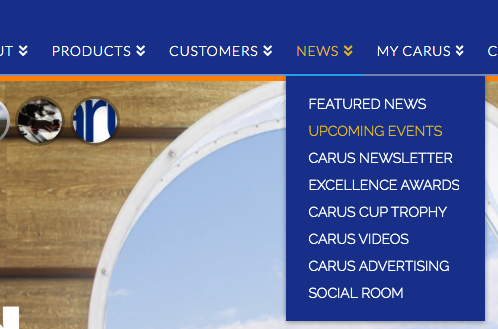
3x92hsIdQQ_wnTryq7g-WA

I can only see a two pixel discrepancy here. The actual navbar top height is 107 and in X > Theme Options > Header > Navbar > Navbar Top Height, you have inserted 105 pixels.

Can yo please give further clarifications and maybe send us some screenshots so that we can have the same idea of what is your issue about?

By the way, @Friech mentioned about the CSS because he noticed that in X > Theme Options > Custom CSS, you have inserted a broken CSS code:

@media (max-width:767px){
    .x-topbar .p-info{
        border:none !important;
    }
    

It is missing a closing } bracket which might also be the case of other CSS that you might have added in the theme.

Please provide a screenshot of your issue and then update the credentials so that we can fully check your site and settings.

Best Regards.

This topic was automatically closed 10 days after the last reply. New replies are no longer allowed.