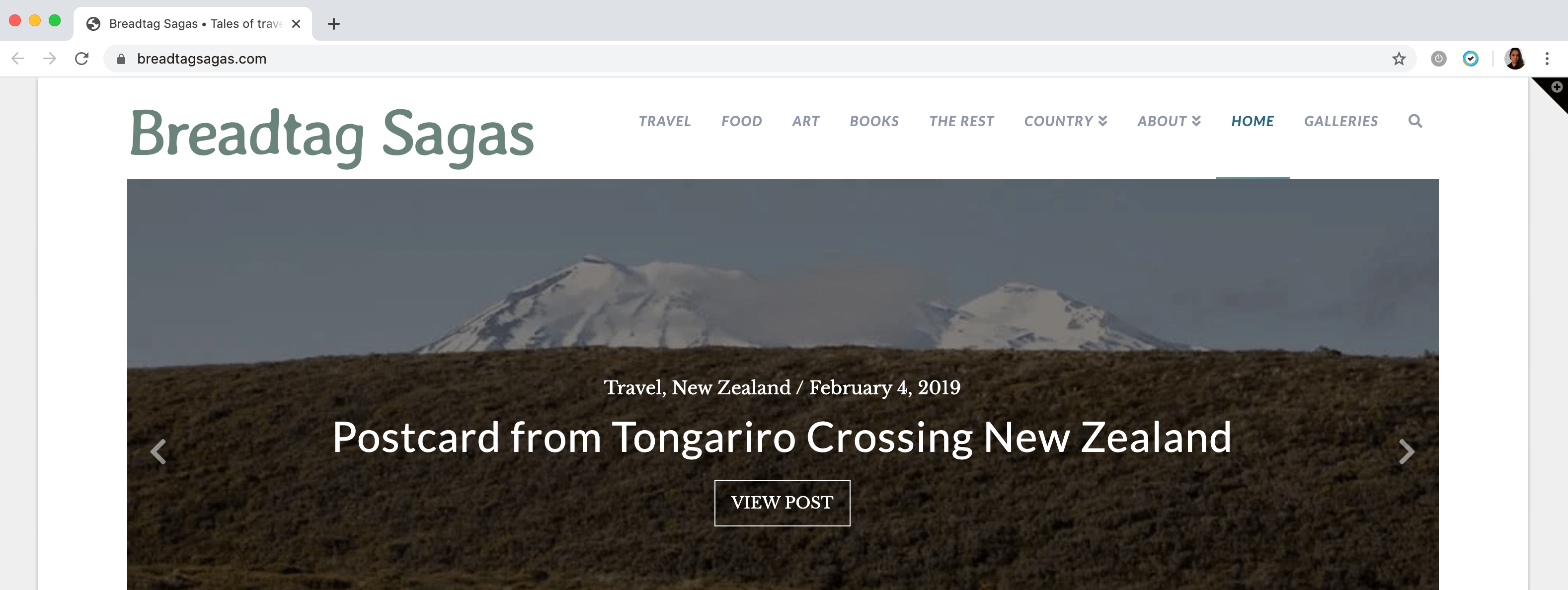
Nav Bar (main menu) disappeared

Hi

I made my last post in New Zealand on 23 January. The post didn’t appear publicly only to emailed followers. At the same time my Nav bar at the top of my site disappeared as well. Today back in Australia I’ve made the post reappear by ticking the sticky box as well as the public publish.

However, I go into Main menu (primary menu) nothing has changed but the nav bar is still missing.

https://breadtagsagas.com/

Any idea why?

Regards
Tony
[email protected]
Hi Tony,

Are you still having issues with the main navigation on your site? I have just checked it and the menu is displaying correctly.

Kindly clear your cache and check again.

Hope this helps.

Hi Jade

I have two computers I regularly use. The MacAir that I travel with and an old mac mini. Both have up to date systems. I think the problem was cache clearing on chrome which I managed to do on the desktop but the chrome browser on my macAir steadfastly refuses to provide the navbar though I’ve cleared the cache on browsing date numerous times. Any idea how to get around this? If I use Safari, the website opens optimally.

Regards Tony

Hey Tony,

It sounds like a browser issue, please follow this article to clear the cache and cookies of Mac entirely https://kb.wisc.edu/page.php?id=15153 and see if this resolves the issue. If the issue persists then try checking the site in Chrome’s Incognito mode https://support.google.com/chrome/answer/95464?co=GENIE.Platform%3DDesktop&hl=en

Let us know how this goes!

This topic was automatically closed 10 days after the last reply. New replies are no longer allowed.