My sale price is not showing up on my shop

Hey, I own www.fanhype.co and all the products are showing sale prices on the actual product page, but on the shop page, it is only showing a line through the original price, but not showing the sale price.

You can see it live at www.fanhype.co/shop or look at this screenshot I took:
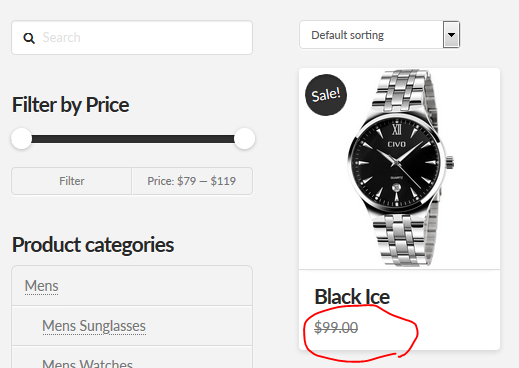
How do I fix this? Thanks.

Hey there,

Please check for the following first:

  1. Ensure everything is up to date according to our version compatibility list at https://theme.co/apex/forum/t/troubleshooting-version-compatibility/195. Please follow the best practices when updating your theme and plugins. See https://theme.co/apex/forum/t/setup-updating-your-themes-and-plugins/62 for more details.

  2. Clear all caches including browser cache then deactivate your caching plugins and other optimization plugins.

  3. If you’re using a CDN, please clear the CDN’s cache and disable optimization services.

  4. Test for a plugin conflict. You can do this by deactivating all third party plugins, and seeing if the problem remains. If it’s fixed, you’ll know a plugin caused the problem, and you can narrow down which one by reactivating them one at a time.

  5. Remove custom CSS, Javascript and templates.

Thanks.

Actually, I found the issue - the font color for sale prices was just white lol… In case anyone else has this problem here’s what I added to global CSS to change the sale price color to red…

/* Sale Price Color */
.eacs-product-carousel.eacs-product-overlay .woocommerce li.product .entry-header .price > .amount, .woocommerce li.product .entry-header .price > ins > .amount {
color: red;
}

Glad to hear you got it sorted.

Cheers!