Please advise how to get my page tits to show on the inside pages of our website. We are using the header builder and the titles are not displaying on any inside pages. This is weird and not very good for SEO nor navigation. We ca not launch our website without having the titles working. ALso there are several bugs in the editor wit the new updates.
Hi There,
Thanks for writing in! Please head over to X settings by clicking the settings icon on the left panel and make sure that the page titles are not disabled.
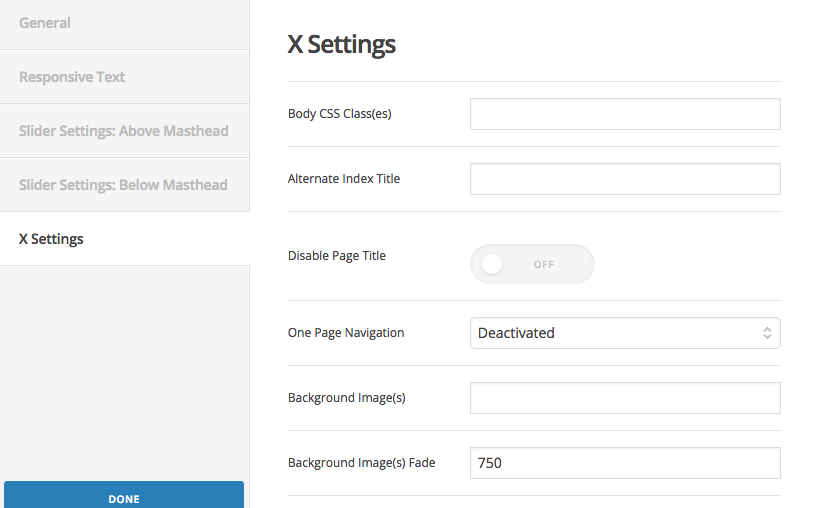
If that doesn’t help, please provide us with a URL to a sample page that you’re having this issue.
Thanks!
Hello here iws the url to a page where the title is missing.
This is a pro header and the title is missing for the page.
This is happening on another website as well that I launched last week due to a deadline launch date.
Hello There,
Thanks for writing in! In renew, the page titles were displayed in the landmark header. Since you are using a custom header, the landmark header were replaced with the header instead. If you still want to display the page title while the custom header is on, please do the following steps below:
1] Using Notepad or TextEdit or Sublime Text or any text editor, please create a new file in your local machine.
2] Insert the following code into that new file
<?php

// =============================================================================
// VIEWS/RENEW/CONTENT-PAGE.PHP
// -----------------------------------------------------------------------------
// Standard page output for Renew.
// =============================================================================

?>

<article id="post-<?php the_ID(); ?>" <?php post_class(); ?>>
  <div class="entry-wrap">
    <?php if ( has_post_thumbnail() ) : ?>
      <div class="entry-featured mtn">
        <?php x_featured_image(); ?>
      </div>
    <?php endif; ?>

    <header class="entry-header">
      <h2 class="entry-title">
        <a href="<?php the_permalink(); ?>" title="<?php echo esc_attr( sprintf( __( 'Permalink to: "%s"', '__x__' ), the_title_attribute( 'echo=0' ) ) ); ?>"><?php x_the_alternate_title(); ?></a>
      </h2>
    </header>

    <?php x_get_view( 'global', '_content' ); ?>
  </div>
</article>
3] Save the file named as content-page.php
4] Upload this file to your server in the child theme’s folder wp-content/themes/pro-child/framework/views/renew/
Hope this helps. Please let us know how it goes.
There are so many issue with PRO now that we updated with 4.9.1.Can you look at out theme editor? We updated PRO and it is broken. I can’t even save edits when I try to make child theme editsASll this after the update. I deleted the aprent theme and reuploaded and still same issues
Hi , I just added the code snippet to a new file within the child theme and nothing has changed?
Here is access to the dashboard… You can see there are several theme issues.
Hello There,
The code is working. The page title is now displayed on the page.


You might be having some caching issues. Please clear the plugin cache and your browser cache as well before testing the site again.
This topic was automatically closed 10 days after the last reply. New replies are no longer allowed.