My default Ethos 1 theme is not the same as demo

Hi,

I recently just downloaded the Ethos 1 theme. I originally used the Integrity 1 theme.

I want my front page to look exactly like in the demo (images with excerpts & just images) but all my blog posts turned out like this: http://zenithsuccess.com/page/2/

I really like the image with excerpts style but I can’t find a way to do it.

Can someone help me?

Thank you!
Hi @ariz90,

Thanks for writing in.

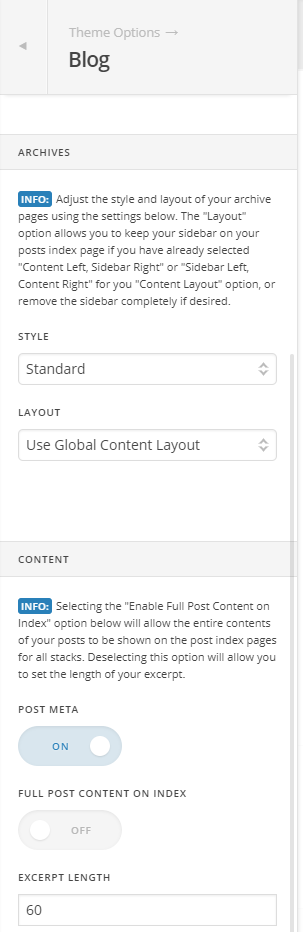
You could enable your excerpts in your Theme Options > Blog

Let us know how it goes.

Thanks.

Hi @nico! Thanks for your reply.

I’ve checked it and it already set like that. I’ve reset it and applied it but nothing changes.

I just want the excerpt to appear at the right side of the thumbnail just like in the demo.

What should I do now?

Thanks.

Hi there,

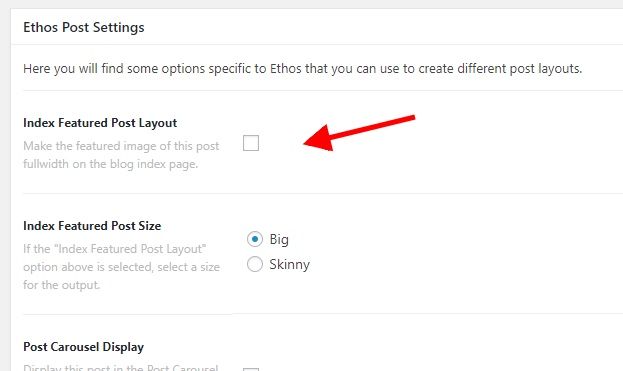
Please edit the posts then disable the Index Featured Post Layout option of the posts so that the featured image will not be displayed fullwidth.

Hope this helps.

1 Like

Hi Jade!

Thanks for your reply! It worked perfectly!.

Thank you.

You’re most welcome.

This topic was automatically closed 10 days after the last reply. New replies are no longer allowed.