My Big Fat White Line

Hi,

I’ve been using pro and trying to get the most out of it for a while now. I’ve been quite pumped to try and create custom post types, but I had to figure out if the layout I’ve wanted in pages would replicate in posts. So what I did was to work a plugin into the mix to get the Blank/No Container template to work in the posts too–which worked perfectly, except for one teensy little thing:
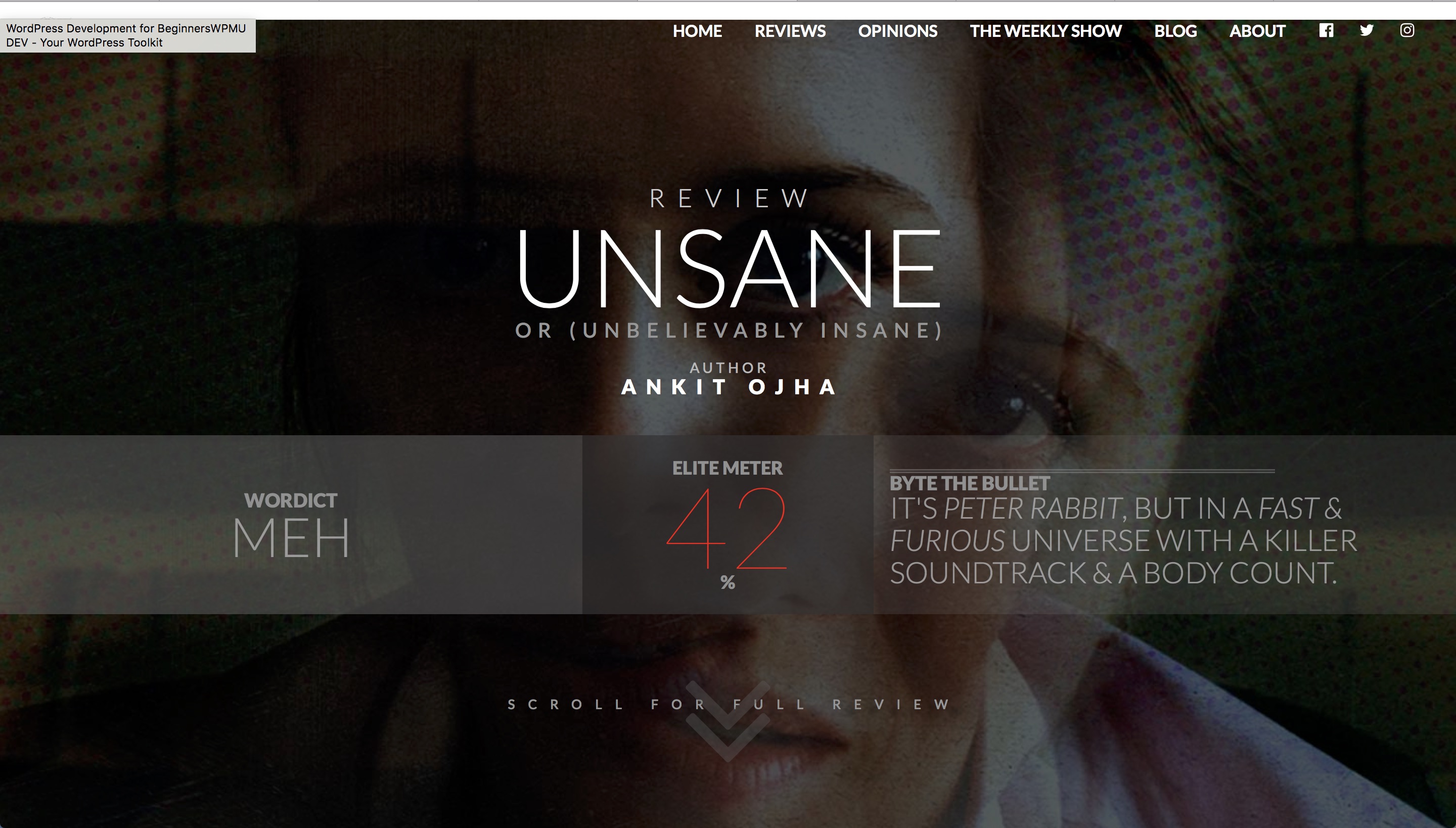
As you can see, there’s a sneaky white line that doesn’t exactly overlap it on the header section the way I’d want it to. I thought there was a bug, so I had to make sure it wasn’t happening anywhere else, and I was right–it wasn’t and there’s no bug:

The above is an output from a page-type. Considering these are reviews, however, I’d have love them to be posts, but I have no idea what to do about that. If you’d like to make an inspection on the above page, I can make it public for a bit and give you a secure note, or I can let you have a password and username in a secure note. Please help me out here, I’ve been on this for 2 days and now I’m just dumbfounded.

Hi there,

Thanks for posting in.

Would you mind providing the site’s URL that has this line? And which browser?

Thanks!

Hi there, there should be a secure note containing the link.

Hello There,

Thanks for providing the urls of your site. The white space is because of this css code:

.entry-content {
    margin-top: 17.5px;
}

Did you added this on purpose? If that’s the case, please have it updated and use this:

.entry-content {
    margin-top: 17.5px;
}

.review-template .entry-content {
    margin-top: 0 !important;
}

Please let us know if this works out for you.

I… i didn’t add this on purpose. I don’t even know how that happened, to be honest. How do I fix it?

AFTERTHOUGHT EDIT: Also, how do I make this solution tentatively futureproof? Is there a way it won’t repeat itself the next time round?

Hi @ankit_ojha,

You need to simply add the code below to Pro > Theme Options > CSS:

.entry-content {
    margin-top: 17.5px;
}

.review-template .entry-content {
    margin-top: 0 !important;
}

Nothing is future proof in the world of web, but in general, we try our best to have our updates in a way that has the least impact on customizations. This question is a matter of CSS and will be easy to fix if there is an update which might cause issues.

Thank you.

This topic was automatically closed 10 days after the last reply. New replies are no longer allowed.