Hi,
I’m using the integrity stack of X & am wondering if its possible to move the blog content to the right of the featured image?
thanks
Hi,
I’m using the integrity stack of X & am wondering if its possible to move the blog content to the right of the featured image?
thanks
Hi,
You can try adding this in X > Launch > Options > CSS
.blog .entry-footer {
    clear: both;
}

.blog .entry-featured {
   float:left;
   width:40%;
}

.blog .entry-wrap {
   float:right;
   width:60%;
}
You may change the width to adjust
Hope that helps.
Thanks for the reply! Unfortunately that doesn’t seem to have any effect! Any other suggestions?
Hi There,
Would you mind sharing your site URL? We need to check your setup. There might be CSS syntax error that stop above CSS from working. If not, it can be cache. Note to clear cache before checking again.
Thanks Lely,
I’ve added a secure note with my login details, so if you could please take a look & let me know what I’m doing wrong? that would be much appreciated!
Thanks
Hi There,
Are you referring to single post?
Please use this custom CSS instead:
  .single-post .entry-footer {
      clear: both;
   }

  .single-post .entry-featured {
     float:left;
     width:40%;
  }

  .single-post .entry-wrap {
     float:right;
     width:60%;
  }
Then remove this custom CSS:
  .entry-featured {
    width: 550px;
    height: 550px;
  }
It is not recommended to define fix height and width. That is not responsive. Please also go to Settings > Reading. Please set Post page from the dropdown. That will be your blog index page.
Hope this helps.
That works! Thanks very much @Lely
One more thing, how do I remove the highlight rollover line above the menu?
Hi There,
You’re always welcome!
Use this to remove the line for active and hover menu link:
  .x-navbar .desktop .x-nav > li > a:hover, .x-navbar .desktop .x-nav > .x-active > a, .x-navbar .desktop .x-nav > .current-menu-item > a {
      box-shadow: none;
  }
Cheers!
Works on the front page but it still seems to appear on other pages. Also would you be able to help me align my logo in the navbar to the menu , remove the line under my slider & change the background from white in the blog & other pages?
Thanks again Lely
Hi again,
Please replace the previous code with this:
.x-navbar .desktop .x-nav > li > a:hover, .x-navbar .desktop .x-nav > .x-active > a, .x-navbar .desktop .x-nav > .current-menu-item > a {
    box-shadow: none !important;
}
To align the menu and your other changes, please use this code:
.masthead-inline .desktop .x-nav {
    margin-top: 21px !important;
}
.x-slider-container.below {
    border-bottom: none !important;
}
.site {
    background-color: #121212 !important;
}
Hope this helps!
You’re welcome.
Also can you tell me how I can move the image to the left of the content for my portfolio items?
thanks
Hi again,
Please also add the following code in your Customizer:
.single-x-portfolio article:after, .single-x-portfolio article:before {
    content: '';
    clear: both;
    display: table;
}
.single-x-portfolio .entry-featured {
    float: left;
    width: 30%;
}
.single-x-portfolio .entry-wrap {
    float: right;
    width: 70%;
}
Let us know how this goes!
Perfect! Thank you!
How can I turn the featured image off on selected pages?
Hi there,
You can simply remove the featured image from the edit page in admin. If you want to have them in listings but not on the single post pages follow the steps below:
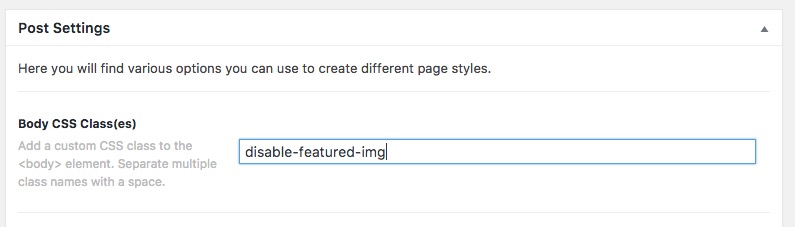
.disable-featured-img .entry-featured {
    display: none;
}
Hope it helps.
Perfect! Thanks again!
Also I was wondering if its possible to make the paragraph wider on the left hand side of the portfolio content where the share buttons & tags would normally be located?
And can I put outline around the featured image?
Hi again,
Please add the following code in your Customizer as well:
.single-x-portfolio .x-portfolio .entry-info {
    width: 100% !important;
}
.single-x-portfolio .entry-featured {
    outline: 2px solid #050505 !important;
    border-bottom: none !important;
}
Hope this helps!
Thanks again! I’ve increased the outline with to 20px but do I get the outline inline with the top of the content to the right?
Hi,
Kindly change outline with border.
Change the code provided with this.
.single-x-portfolio .x-portfolio .entry-info {
    width: 100% !important;
}
.single-x-portfolio .entry-featured {
    border: 20px solid #050505 !important;
}
Hope that helps.