can I move the portfolio navigation arrows to the center under the image
I would like to move them to above (Share This Prodject)

Another edit I want to make is can I change (Share This Project) to some other words how can I edit this text?
can I move the portfolio navigation arrows to the center under the image
I would like to move them to above (Share This Prodject)
Another edit I want to make is can I change (Share This Project) to some other words how can I edit this text?
Hi @rotation,
It is possible but it needs customization. It was added on it’s current location using the following template file:
\wp-content\themes\x\framework\legacy\cranium\headers\views\integrity\_breadcrumbs.php
If you want it to hide on current location, please copy that file on the same location on your child theme here:
\wp-content\themes\x-child\framework\legacy\cranium\headers\views\integrity\_breadcrumbs.php
You might need to create the entire folder path on your child theme.
Then on line 19, you can see this:
<?php if ( is_single() || x_is_portfolio_item() ) : ?>
On the copied file on your child theme, update that line to this:
<?php if ( is_single() ) : ?>
To show it under the feature image, we need to edit another template.
\wp-content\themes\x\framework\views\integrity\content-portfolio.php
Same process, copy it on the same folder on your child theme.
\wp-content\themes\x-child\framework\views\integrity\content-portfolio.php
Open the copied file on your child theme, add this line below the featured image code either inside the container or you may create another container for it:
<?php x_entry_navigation(); ?>
Please note that issues that comes up because of customization is outside the scope of our support.
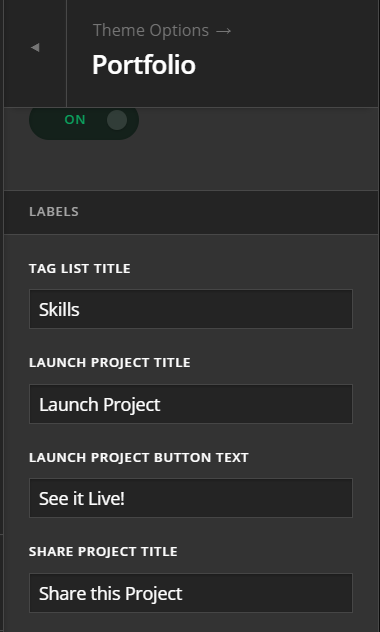
To edit Share This Project text, please go to Theme Options > Portfolio
Hope this helps.
I got the share this project edit that was easy, Thanks. The arrow move to the bottom seems like a big change in the frame work, could this cause issues later for the theme or how the site works on all devices?
Hi @rotation,
That should be fine as long as you did the changes using the child theme. However, it cannot say for certain if this will remain to work in future updates in case the file you have overriden will change the code in the parent theme. In case that happens, you will also need to update the code that is in your child theme as you will be responsible to maintain the code for the customization done.
Hope this helps.
This topic was automatically closed 10 days after the last reply. New replies are no longer allowed.