Hi started testing the mosaic grid, the left and right margins on the container and grid are set to auto but I can’t get the vertical lines to align with the grid?

Hi Kilian,
Thanks for reaching out.
The template for that mosais is intended to have that look, but I’m not sure which lines you’re currently referring. And those lines are coming from custom CSS that is imported along with the template, and it can’t be centered.
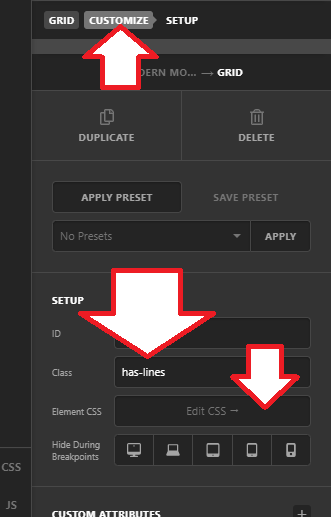
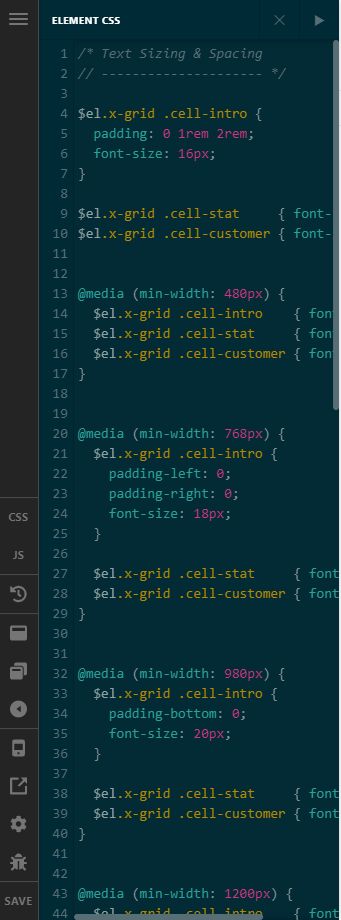
You can remove this CSS from that custom CSS
/* Matching Grid Lines
// ------------------- */

$el.x-grid.has-lines {
  overflow: hidden;
}


$el.x-grid.has-lines:before {
  content: "";
  display: block;
  position: absolute;
  z-index: 0;
  top: 0;
  left: -1px;
  bottom: 0;
  width: 1px;
  color: #f0f0f0;
  background-color: currentColor;
  pointer-events: none;
  box-shadow:
    calc((100vw / 4) * 1 + 1px) 0 0 0,
    calc((100vw / 4) * 2 + 1px) 0 0 0,
    calc((100vw / 4) * 3 + 1px) 0 0 0,
    calc((100vw / 4) * 4 + 1px) 0 0 0;
}


@media (min-width: 481px) {
  $el.x-grid.has-lines:before {
    box-shadow:
      calc((100vw / 6) * 1 + 1px) 0 0 0,
      calc((100vw / 6) * 2 + 1px) 0 0 0,
      calc((100vw / 6) * 3 + 1px) 0 0 0,
      calc((100vw / 6) * 4 + 1px) 0 0 0,
      calc((100vw / 6) * 5 + 1px) 0 0 0,
      calc((100vw / 6) * 6 + 1px) 0 0 0;
  }
}


@media (min-width: 980px) {
  $el.x-grid.has-lines:before {
    box-shadow:
      calc((100vw / 8) * 1 + 1px) 0 0 0,
      calc((100vw / 8) * 2 + 1px) 0 0 0,
      calc((100vw / 8) * 3 + 1px) 0 0 0,
      calc((100vw / 8) * 4 + 1px) 0 0 0,
      calc((100vw / 8) * 5 + 1px) 0 0 0,
      calc((100vw / 8) * 6 + 1px) 0 0 0,
      calc((100vw / 8) * 7 + 1px) 0 0 0,
      calc((100vw / 8) * 8 + 1px) 0 0 0;
  }
}
Regardless of modification, it may not aligned with the grid especially it changes based on content and viewport size. The custom CSS just divided the viewport size and apply borders and not really connected to the grids. If you wish to apply lines to the grid directly, then I recommend utilizing the grid cell border options.
Thanks!
Hi Rad,
I was following the tutorial here and the vertical lines across the grid in this tutorial https://youtu.be/QFqAz7vWfrg?t=920 are aligned to the cell contents, the CSS code used in the screenshot in the first post is identical to custom CSS above and the tutorial.
Just trying to understand how the viewport column width which sets the vertical line spacing and the grid cell widths are different when there’s no margin/padding/global container around the grid?
From what I’ve understood, both methods to divide the screen into 8 equal columns should reach the same result:
1fr in the grid columns template
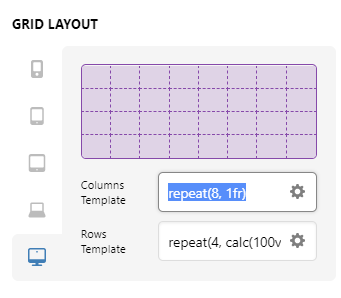
And calc((100vw / 8) in the custom CSS
Hi Kilian,
Indeed, they are aligned since it’s made specifically for that layout, which I’m referring to to as intended look. Modifying your grid isn’t enough, you should also modify the custom CSS mentioned in the Video.
And since you already modified of how it looks especially the grid structure, the custom CSS doesn’t match anymore. Again, those lines aren’t connected to the grid you’re changing but you’re indeed correct with the modification that you’re going to achieve, for example, on that custom CSS, it has this
@media (min-width: 980px) {
calc((100vw / 8) * 1 + 1px) 0 0 0,
Which means, on desktop view ( 980px and above ), there will be 8 columned border, 100vw is equivalent to 100% width of the viewport, that means 12.5% width (12.5vw) per column, then since it uses box-shadow, then it will be rendered as a border.
And then @media (min-width: 481px) 6 division for tablet, then the rest of view is 4 division. This implementation would change as well depending on how many viewports you have your grid structure was changed. You can ignore the 1fr since it’s only vertical lines, you can match your custom CSS with repeat(8), repeat(6), repeat(4) of the columns template. And changes in spaces (eg. padding, gaps, and margins) could throw off the alignment as well. Please also note, that box-shadow and its multiplier are repeated as well equal to the number of columns
      calc((100vw / 8) * 1 + 1px) 0 0 0, --> 1
      calc((100vw / 8) * 2 + 1px) 0 0 0, --> 2
...
...
...
      calc((100vw / 8) * 8 + 1px) 0 0 0;  --> 8
Unfortunately, although the CSS is coming from the import, we don’t maintain user codes especially they already changed/customized it.
Thanks!
This topic was automatically closed 10 days after the last reply. New replies are no longer allowed.