More question

I’m starting with PRO (4.2.2) because I believe it can be more stimulating and creative than the competition. I have several questions to ask on my short tour with a test installation.

  1. Background Pattern doesn’t have the W and H values ​​that you see in the guide, so I can’t resize the pattern I have to have it loaded is this right?
  2. You have to start with a stak as a base there isn’t an empty stack so to speak right?
  3. I can override the header settings of a stack by simply creating a new custom header, the new custom header will overwrite the original stack right?
  4. If I install an entire cloud design site, does this use a new starter stack?
  5. If I install an entire cloud design site, can I add elements in the header, content, footer or replace them with a custom one?
  6. Why do I find double pages after installing a new design cloud site after installation?
  7. Can the x-widgetbar be deactivated / activated? his style options where do I find him?

Thank you
Hi @xonetit,

Thanks for reaching out.
Please find the answer to your queries below:

  1. Background Pattern doesn’t have the W and H values ​​that you see in the guide, so I can’t resize the pattern I have to have it loaded is this right?

Answer: The option for the Width and Height has been removed in the latest version of the theme.

2.You have to start with a stak as a base there isn’t an empty stack so to speak right?

Answer: The default stack is Integrity

  1. I can override the header settings of a stack by simply creating a new custom header, the new custom header will overwrite the original stack right?

Answer: The custom header will override the Header style of the Stack once the header is assigned to any pages.

  1. If I install an entire cloud design site, does this use a new starter stack?

Answer: Different design cloud demos use different stacks, and it selects the stack based on what you imported.

  1. If I install an entire cloud design site, can I add elements in the header, content, footer or replace them with a custom one?
    Answer: Yes

  2. Why do I find double pages after installing a new design cloud site after installation?

Answer: Might be imported twice, or showing the pages from other installation which imported before.

  1. Can the x-widgetbar be deactivated/activated? his style options where do I find him?

Answer: If you are talking about the Sidebar, regretfully, there is no such option to deactivate it.

Hope it helps.
Thanks

  1. Why do I find double pages after installing a new design cloud site after installation?

Answer : Might be imported twice, or showing the pages from other installation which imported before.
so what is the procedure to change or replace a site version of desgin cloud, to not find all the double pages?

  1. Can the x-widgetbar be deactivated/activated? his style options where do I find him?

Answer : If you are talking about the Sidebar , regretfully, there is no such option to deactivate it.
I mean the top foldaway top bar with x-widgetbar class

thanks

Hey @xonetit,

Before you install another Design Cloud Site, you’ll need to, regretfully, manually delete the imported pages. The Design Cloud Sites are best tested in a staging server if you’re not yet sure of the final design of your site.

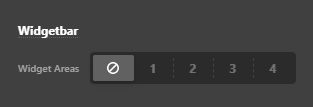
You can disable it in Theme Options > Headers > Widgetbar

image

Hope that helps.

This topic was automatically closed 10 days after the last reply. New replies are no longer allowed.