Modern Events Calendar won't display the next month

Hello,

I have set up my repeating event on MEC. The page displays a June calendar. However, when I click on JULY, it does not go anywhere. I do not know what I need to change. Please help. Thank you.
http://walkandtalkny.com/index.php/events/brooklyn-old-and-new-tour/

Hello There,

Thanks for writing in! It seems that there is a JS error on the page. Could you please update to the latest versions?
Our latest versions are:
- X theme 6.1.6
- Cornerstone 3.1.6

This latest release contains fixes for several issues so be sure to check out the changelog (http://theme.co/changelog/).

_After doing the updates, always remember to clear all caches (if you are using WP Rocket, WP SuperCache or W3 Total Cache) when updating so that the code from the latest release is always in use. This will help you to avoid any potential errors.-

Please let us know how it goes.

Hello,

Thank you for leading me to do updates. I should have done that a long time ago, apparently!
But, it still doesn’t work. I cleared the cache before and after the updates, and refreshed the pages. Is there anything else I can do? Thanks.

Hi @MilayoC,

I could see that you have an internal server error when accessing MEC on your site.

Please try to contact your Hosting regarding this error. Usually, hosting could easily track this kind of error.

Let us know how it goes.

Thanks.

Hello,

I contacted Hostgator and the person ran a test and could not find any server error. I also shared your screenshot with that person. They suggested that I re-install WordPress and the plugin. I am hesitant to do even the re-install of MEC because I will lose my settings.

Hi,

You can backup your site using this third party plugin

Please try temporarily activating the default Twenty Fifteen theme and seeing if the issue persists.

If the issue persist you can then try re-installing the mec plugin. Deactivate and delete from plugins page and install back via X > Validation

Re-installing the plugin will only replace the files and settings will still be the same.

Remember to do a full backup of your site first before doing anything else.

Thanks

Thanks!

I have Updraft Plus and the site is backed up. Please forgive the newbie question: To temporarily activate Twenty Fifteen do I just click on “Activate” from Appearances-Themes? If I do that and then go back and activate X theme again then I will still have all of my pages and info in X theme?

Hey There,

Before you do the theme switch, please go to X > Validation and find the Theme Options Manager. Download the XCS file to your computer. This will save your X theme options settings and we can use it later on to make sure that you’ll have the same settings as before.

And then go to Appearance > Themes and activate “TwentyTen” theme. When you switch back to X theme, you will have to go to X > Validation > Theme Options Manager again and import the XCS settings. All the pages and posts created before will still be there and no changes should take place.

Hope this helps.

Hello,

Thank you - when I go to Theme Options Manager all I see is an option to download an xcs file from my files. I’m so sorry but I don’t know where the xcs file is located on my computer.
screenshot: https://prnt.sc/jyxd6v

Hi Milayo,

If you see the lower section of the Theme Options Manager you will see a button to export the settings:
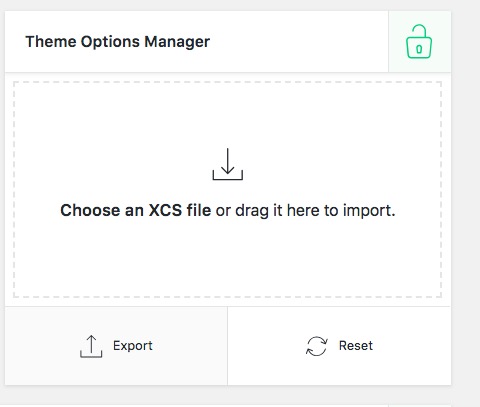
Click on that button and wait for a moment, then your browser will download a file with the name of: YOURWEBSITENAME-xcs.json

Save that file for the future to upload later. Please consider that you need to make sure you have the version 6.1.6 of the Theme and version 3.1.6 of the Cornerstone plugin to do that.

I double checked the link you gave us which is the event page and I also do see the error 500. I am sorry but it seems your hosting service support did not do a good job. They clearly should give you the error log to see what is the actual problem. The error 500 is not the actual problem, the host manager should check the error log and give you the actual one.

Thank you.

Thank you for the suggestions and steps so far. Please don’t close this topic; I am still working on it! :slight_smile:

Hi Milayo,

I understand that you still want to follow up the case, please get back to us whenever you finished your work and by replying to the thread it will be opened automatically.

All the threads will get closed after 10 days of the inactivity automatically by the system. If that happens, you can open up a new thread and link to this thread so we can understand that the problem is the follow up of this one.

Thank you.

Thank you all for the help. As I am new at this, I am so afraid of switching themes. I know I have a backup but it’s not like I know how to use it. And I don’t want to have to! I tried deleting and re-installing the MEC plug-in, but there were still problems. I understand that you are saying the problem is with the host. Right now, I just need some kind of way to process bookings. So I did a workaround with WP Simple Booking, a form and a PayPal button. It’s not nearly as elegant as MEC, (and I spent so much time setting up MEC) but it’s functional. And it will be ok for now, until I can get an actual web designer to do this kind of stuff in the future.
So, again, thank you!

You’re welcome.

This topic was automatically closed 10 days after the last reply. New replies are no longer allowed.