Modern Events Calendar update 3.1.0

Hi,

The latest update of MEC broke my site. I had to deactivate it to get my site up again. After that I removed it and reinstalled it. Right now I can’t activate the reinstalled version because it is causing a fatal error. I deactivated all other plugins (except cornerstone) and got the same error. I’m at a loss as how to get it working again. Any help/suggestions are very welcome!

Here also an this says the Console from Chrome. Its an js issue
Have also tried some steps of deactivating all other Plugins no Change.

Uncaught TypeError: $(…).datepicker is not a function
at HTMLDocument. (events.js:159)
at i (jquery.js:2)
at Object.fireWith [as resolveWith] (jquery.js:2)
at Function.ready (jquery.js:2)
at HTMLDocument.K (jquery.js:2)

Hi @arnoldmeulenbeld

I couldn’t reproduce this issue at my localhost, please provide us with FTP login details in Secure Note as well to investigate this issue.

@The-E-Blog please open a new support thread regarding this question, most probably we will need login details as well, providing such sensitive information can’t be done on other users threads, as secure notes will be visible for the thread owner as along with our stuff.

Thanks.

Hi,

I updated the secure note with FTP details.

Regards, Arnold

Hello @arnoldmeulenbeld,

Thanks for updating the thread. :slight_smile:

I deleted the MEC plugin that was in deactivated state and then installed MEC plugin by uploading the zip file of the plugin. After that I activated MEC and it’s working fine. Please see screenshots in secure note.

You can get the zip files of bundled plugins by downloading the complete package of X theme from Themeforest. Here’s screenshot. Extract the downloaded folder and under Extensions directory you can find the zip files.

Thanks.

Thank you very much for fixing this. Although I have to say that it’s more like a roll back to a previous version. The latest version 3.1.0 is still ready for automatic update in the admin area and that was the version that was causing the troubles. And indeed, after updating my site is gone again. So, I’m sorry to say you didn’t fix the problem.

Regards, Arnold

Hey Arnold,

Regretfully, like @Alaa, this issue does not happen in my test site with MEC 3.1.0 also. This tells us that there’s something wrong in your server and/or WordPress setup. I checked your php_errorlog and there are errors related to the Flow Flow third party plugin but none was recorded for MEC. Though you said, you deactivated third party plugins, a third party plugin could leave settings that could cause issues.

I checked your wp-config.php and you also have not configured your salt keys which could be a potential cause.
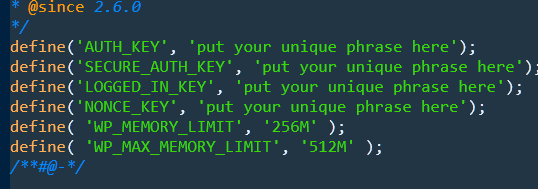
Regretfully, since it’s a live site, we can’t troubleshoot in there due to the risk involved when troubleshooting. I’d recommend that you copy your site to a clean staging environment with a clean WordPress install and only install X, Cornerstone and MEC. We need to check if this is an issue with MEC first and not caused by third party factors.

Thanks.

#resolved.
I removed my custom single.php wich caused the fatal error after the update. Will look further into it, but for now everything is working again.

Glad to hear that. :slight_smile:

This topic was automatically closed 10 days after the last reply. New replies are no longer allowed.