I am having trouble with Anchor links in my header modal nav.
the links are there and when I hover over them the partical works and the text shows up, it seems to be when you are on the page a bit down from the top the Anchor links (type) is transparent or white and will not show up. Please see the attached screen shot of how this looks when I am not logged in using firefox.

Hello @lorchme,
Thanks for writing in!
This is happening because you have set the hover text color to white. Please edit your header, click the navigation modal and in the navigation modal settings, find the “Menu > Links > Text > Text Color” option and set the color for the interaction to any color other than white.
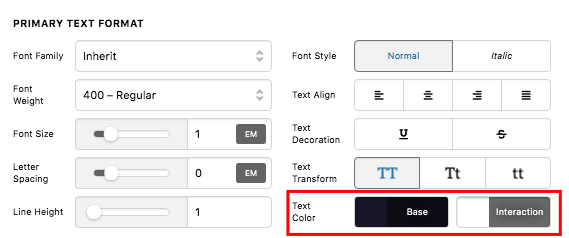
We would love to know if this has worked for you. Thank you.
Sorry, I dont think I explained what the problem is.
When I click on the link “About Us” it takes me to the Anchor link and looks fine until I click on the Menu again. Then the other anchor links (after Clients and Contracts) the type is white and should be Blue like “Clients, Case Studies etc” When you hover over any of the links it is fine the brown comes in and the type is white and you can see it. Note this only happens on the home page ( I think its because they are Anchor links)
Hi @lorchme,
Thank you for the clarification, a couple of things here, please make sure you’re only using the ID link (#contact), not an absolute link (https://yoursite.com/#contact) on your one-page menu. Second, do not set your One Page Menu as the Primary Menu.

With that said, you need to duplicate your menu and header and set the duplicates as the global header, and since you want to link this duplicate header/menu back to your homepage, you need to use the menu with absolute link (https://yoursite.com/#contact) on this duplicate header.
The original menu and header should only be assigned on the homepage, and used ID link (#contact) on this menu.
More details about one page navigation
Let us know how it goes,
Cheers!
Thanks, I believe that worked.
Glad that we could be of help.
Cheers!
This topic was automatically closed 10 days after the last reply. New replies are no longer allowed.