Hi,
Just setting up X with demo content via Design Cloud (Nonprofit presets) and Modal Calendar.
I created a content area in the homepage and dropped in the shortcode. Looks really broken. Any ideas?
Hi,
Just setting up X with demo content via Design Cloud (Nonprofit presets) and Modal Calendar.
I created a content area in the homepage and dropped in the shortcode. Looks really broken. Any ideas?
Just an update, I found some instructions in another post: https://theme.co/apex/forum/t/css-conflict-in-m-e-calendar/69619/6
I added the CSS and it worked for certain width screens, but then breaks. I have included the below video for reference.
Hi @edwardo0907,
Thank you for writing in, the issue is within the ROW of that calendar. As you can see on the screenshot below, the Layout of that ROW for the extra-large screen is 4 columns. that is why the calendar looks only taking the 1/4 area of the ROW. Please set that to one column and the calendar will take the entire width of the row just like on the other layout screen-size.
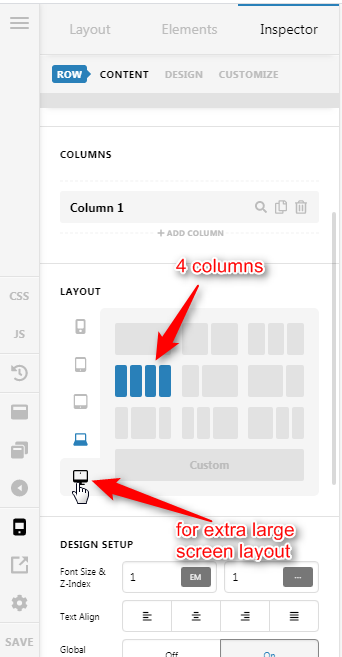
Hope it helps,
Cheers!
This topic was automatically closed 10 days after the last reply. New replies are no longer allowed.