Dear support,
After I upgrade to the latest X theme, I found that in mobile version, the main menu items are all showing up and cannot be hided. Could you please check?
Cheers,
Ken
Dear support,
After I upgrade to the latest X theme, I found that in mobile version, the main menu items are all showing up and cannot be hided. Could you please check?
Cheers,
Ken
Hello @kanken,
Thanks for asking. 
I see couple of error messages showing up in browser console. Please see screenshot. https://cloudup.com/cF3Ax2lRfgX
Please try clearing cache and try again. In case, clearing cache does not help please please share website credentials (username/password) in a secure note for us to take a closer look.
Thanks.
Hi Prasant,
Thanks for the checking. I have refreshed the cache but still go the same result. I tested in Firefox responsive mode and have no problem but the menu is still over iphone and ipad.
Here is the website credentials.
Cheers,
Ken
Hi @kanken,
I could see that there is a lot errors showing in your browser console and it is a script conflict.
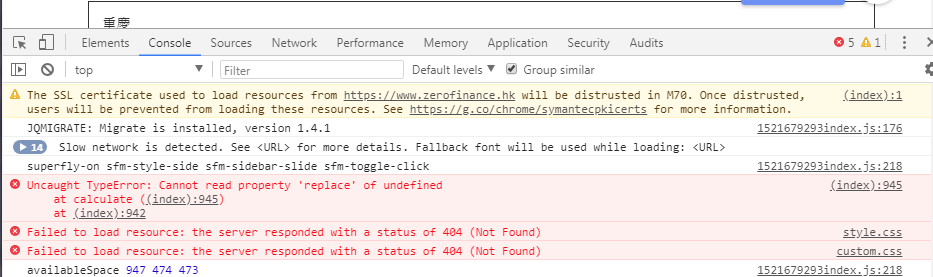
Would you mind testing for plugin conflict. You can do this by deactivating all third party plugins, and seeing if the problem remains. If it’s fixed, you’ll know a plugin caused the problem, and you can narrow down which one by reactivating them one at a time.
Let us know how it goes!
Thanks.
Hi Nico,
I see one of the 404 error is about the X theme. Is it possible to update the X theme again to get back the missing files?
Cheers,
Ken
Hi there,
X theme doesn’t have custom.css, it’s probably your own files added to X theme folder. And got deleted upon update, which is why we recommend to add your customization and files to a child theme. Unfortunately, the only way to retrieve it is to restore your site from our backup copy.
Thanks!
This topic was automatically closed 10 days after the last reply. New replies are no longer allowed.