Mobile site content running to edges of screen

I’m using X Theme Ethos stack demo 1. Just the regular blog roll version for my website.

I have a staging site for my news website:

Summary

https://ocmonitor.staging.wpengine.com/ my live site is OCMonitor.com for comparison.

A few months ago I was working on placing an ad zone on the front page between the featured post slider and the blog roll of posts.

It has been a while and I lack any coding skill so I can’t remember how I got to the solution I have on my staging site, but it looks like I ended up adding a template tag from my WP Pro Adverting plugin to a wp-index.php file and uploaded it to wp-content>themes>x-child>views>ethos. There is also an _index.php file in that same folder.

The code I added was this:

<?php echo do_shortcode("[pro_ad_display_adzone id= MY ZONE-ID]”); ?>

That actually worked perfectly, or so I thought. It did exactly what I wanted it to do on desktop, but when I deployed the staging to my live site today the site all of the sudden went to full-width. Which wasn’t a problem, I jumped into the customizer and switched it to boxed layout and thought everything was fine.

However, and here is the problem I noticed, on mobile the content runs all the way to the edges of the screen. As I said, the only thing I did was add the template tag code to the wp-index.php file on the staging site.

How do I keep the ad zone where I want it and get the mobile version of my site from running to the edges of the screen?

Summary <?php // ============================================================================= // VIEWS/ETHOS/WP-INDEX.PHP // ----------------------------------------------------------------------------- // Index page output for Ethos. // ============================================================================= $is_filterable_index = is_home() && x_get_option( 'x_ethos_filterable_index_enable' ) == 1; ?> <?php get_header(); ?>
<?php x_get_view( 'ethos', '_post', 'slider' ); ?>

<div class="offset cf">
  <div class="<?php x_main_content_class(); ?>" role="main">
<?php echo do_shortcode("[pro_ad_display_adzone id=53705]"); ?>
    <?php if ( $is_filterable_index ) : ?>
      <?php x_get_view( 'ethos', '_index' ); ?>
    <?php else : ?>
      <?php x_get_view( 'global', '_index' ); ?>
    <?php endif; ?>

  </div>

  <?php get_sidebar(); ?>

</div>
<?php get_footer(); ?>

Thanks for the help.

BRATCH77

Hi there,

Thanks for writing around! I checked your setup, the first thing I noticed is you’re using an outdated version of Cornerstone with the updated version of X. Please make sure to update both X and Cornerstone to the latest version to avoid potential conflicts.

Also I believe you’re using an old version of Child Theme, please copy your customization and changes first and then delete your Child Theme and install the latest version of Child Theme you can download the latest version by visiting your dashboard https://theme.co/apex/dashboard

Let us know how this goes!

Thank you for the response. I’ve only ever updated when the updates show up. In fact, I never have anything showing needing to be updated. It bothers me to see them there.

So, how is it that Cornerstone hasn’t updated properly for me?

Also, is there a quick and easy way to copy my customizations for the new child theme install?

BRATCH77

Hi again,

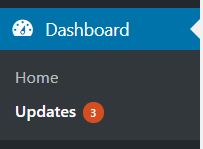
To check for the available updates go to Dashboard > Updates (see screenshot) and you’ll find all the available updates in there. After updating Cornerstone and other outdated extensions, first try to disable your child theme and activate the parent theme and see if this resolves issues, if it does then there are customization in your Child Theme that are very old and it’s not supported anymore, you’ll need to remove those customization parts as well.

After figuring out the issues and removing the conflicting customization, you can copy the files from old child theme to the new one and install it.

Hope this helps!

That’s what I’m talking about, I’ve never had any updates showing like that. As I said, I can’t stand to see that little notification so I update immediately when I seem them.

Anyway, we’re past that as I noticed the up-to-date Cornerstone plugin is installed, but not activated for some weird reason. I deleted the old version and activated the new.

So, on my staging site, I was looking for a place to park my wp-index.php file which used to reside in wp-content>themes>x-child>framework>views>ethos and there was an _index.php in there as well. Now the individual stack folders aren’t there.

Therefore, I placed my wp-idex.php file into the “views” folder and nothing happened. However, when I created the “ethos” folder and placed the wp-index.php file into it I am quite literally back to square one. There is no padding on the sides of my site. It runs completely to the edge of screens.

Cornerstone is now updated to 2.1.6 and the X-child should be new, I downloaded it from the Themeco site.

Thanks for the help.

BRATCH77

Hi again,

This explains it, the customization you are using in your Child Theme are based on old structure which is not supported anymore. Would you mind providing the code here so we can take a look at your customized file? In the mean time copy the file from the parent theme to make sure the structure is updated and supported then make your changes in the file and upload the file to the Child Theme. This should fix the issue.

Let us know how this goes!

Well, I figure out the problem. The code I was using is in the very first post I made, by the way. Not sure why I hid it and made it private in the first post, but I did.

Anyway, the issue was this line of code:

. Well, that is the fixed version.

The one that was causing me problems was said “x-container-fluid-max-width-main.” The “fluid” was not allowing any padding on the sides. Everything seems to be working fine.

I got the Cornerstone updated and I installed the news child theme so I think the fluid was the only problem.

Thanks for the idea to look at the parent wp-index.php file. I compared the two and that was the only difference.

BRATCH77

Glad we could help :slight_smile:

Cheers!

This topic was automatically closed 10 days after the last reply. New replies are no longer allowed.