Mobile Search Bar

In the mobile version of the website craftcoffeeguru.com I have 2 issues I cannot seem to resolve

1- I cannot seem to place a search bar option when using the hamburger menu
2 - there is a small plus sign in the top right, when it click on it, it gives default email address of potri.in/index.
… can you let me know how to remove this unknown email address?

Hi Tico,

Thanks for reaching out.
I have checked your website in the mobile using the Browser Device Tools and didn’t find the issue shown in the screenshot. Even it does not come up with the + sign at the Top Right corner. And the Search option can be found within the Menu itself.

Thanks

First of all… thank you for the quick reply.

Is their any reason you can think of of why on my phone…an iphone… I am getting the view as mentioned in my original note?

Hello Tico,

I checked your site on the iPhone(7 plus) it seems that it is working the search box is there.

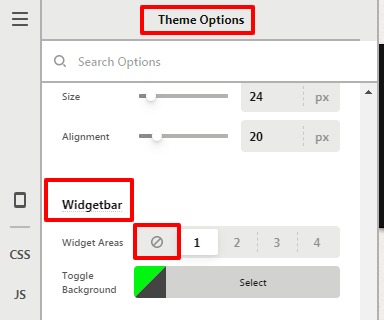
For the Plus Icon, in case, if you want to disable it or change the content that is coming. Go to X —>Theme Option —>Header—>Widgetbar—>Widget areas as “Stop” icon to remove the plus icon.
Theme-Options-X (2)

To change the content you need to go to the Appearance—>Widget—>Check in the Header widgets

Hope it helps
Thanks

Thanks again for the fast reply.

I was able to resolve the issue of the URL and will look into why I am not able to see the search button on my mobile device. If I have any additional questions, I will reach out again.

Thanks again

You are most welcome Tico.

This topic was automatically closed 10 days after the last reply. New replies are no longer allowed.