Mobile optimization for Pro Headers

I’ve inherited a site that was sort of cobbled together in Pro and I’ve already sunk more time into the Headers than anything else.

The last major outstanding issue is mobile optimization of the headers. There are two headers, one on the index page:

https://fpn.cornermarket.media/ (includes large hero image)

And a global one on all the other pages, such as this one:
https://fpn.cornermarket.media/about/

In both cases the main navigation header (white bar) do not work properly. On the Hero header, the white menu bar scrolls horizontally. On the global non-hero header, the navigation is just not there. In both cases I would just like it to be a hamburger menu.

The blue lightbox menu is also ugly on the Hero header (text gets cut off and buttons are funny sizes) and I would like it to look like the blue lightbox menu on the non Hero header. But I can probably troubleshoot this one myself, probably just didn’t copy the settinfs correctly. (Being able to move and duplicate bars BETWEEN headers would be a phenomenal feature, btw.)

Thanks in advance for your help.
Hi @aminusmama,

Thanks for reaching out.

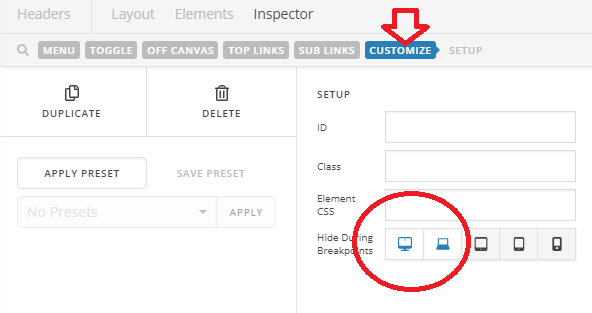
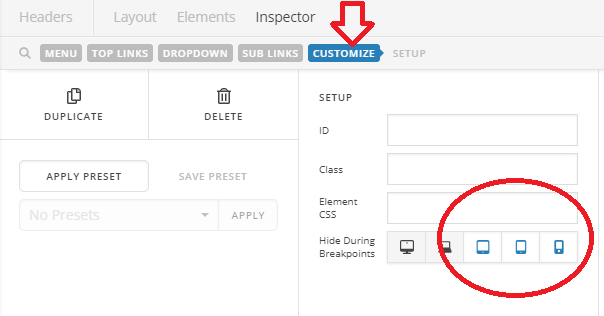
It’s related to HIDE DURING BREAKPOINTS option. It has to manually done since it’s a custom header (your own built header). I checked yours and you partially used it but a bit wrong.

You’re supposed to have multiple menu (inline navigation and collapse menu), and each menu should be displayed to each device.

Examples:

  1. Please add inline navigation element then go to customize section and hide it from mobiles

  1. Then add a collapse navigation and then hide it from desktop

And that’s it :slight_smile:

In your current setup, you only display the same navigation on both desktop and mobiles here https://fpn.cornermarket.media/. And you correctly hide the inline navigation here https://fpn.cornermarket.media/about/, but you didn’t add a collapse navigation.

In X standard header, it functions the same. One desktop menu and one mobile menu, it just looks simple since it’s done automatically. But in Pro custom header, you have to do it manually.

Thanks!

Wonderful, thank you!!! I knew there was probably a simple solution that I was missing.

You’re most welcome!

This topic was automatically closed 10 days after the last reply. New replies are no longer allowed.