Mobile nav shows no interaction + mobile sticky menu disapperas

Hola rock stars!

I’ve set up a separate hamburger mobile menu on: https://cafeekudden.se/

front-end login: ekudden

  1. I can see my interaction when hovering nav buttons in the header builder editor, but nav buttons don’t change at all upon click on my iPhone6. I would love for them to be orange on hover or at least on click.

  2. I would love for my mobile sticky menu to be present all the time (after scroll down from initial veiw of course). I can’t find settings for that. Sticky offset is set to 0.

Please help.

<3

Hey there,

  1. I see the interaction upon tapping the a nav menu. Hover on mobile devices is not possible.

  2. You have a sticky desktop nav with offset of 400. That affects the mobile sticky nav too. It would be best to use only 1 sticky nav and just hide elements inside it like using an inline nav for desktop and collapsed navigation on mobile all in one sticky bar.

Thanks.

1 Like

Hola rock star!

  1. Yeah, I get that hover is not possible. The nav links should, in collapsed mobile menu, turn orange on interaction and show a small orange dot primary particle. I see that in the builder and on an old iphone 4 but not on my (updated) iPhone 6…so maybe it’s still the phone’s fault…?
  2. Great advice. Works perfect. Thanx! :slight_smile:

<3

Hi again!

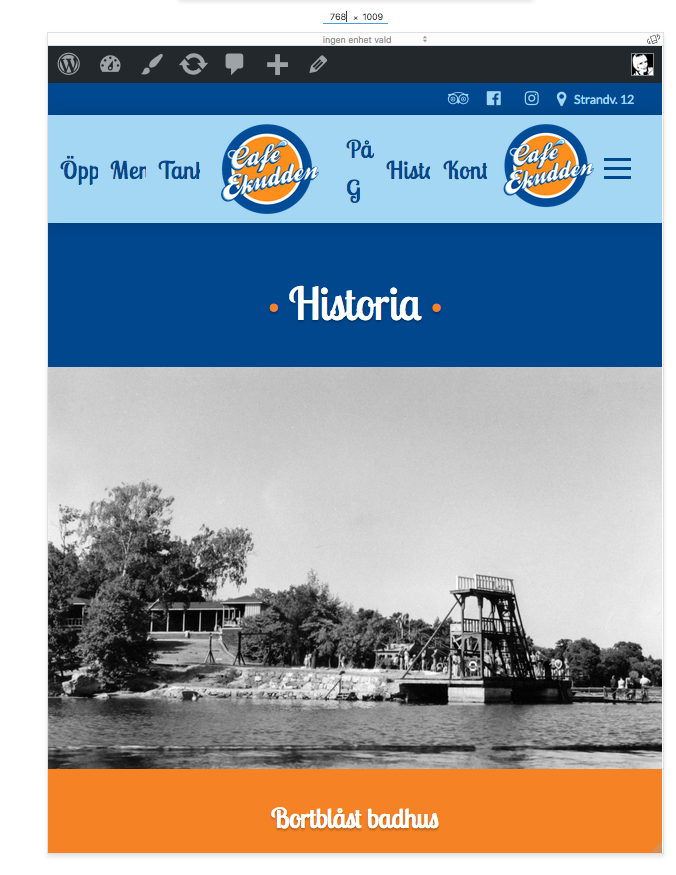
I have double menus showing only between screen size 767px to 768px.

I can’t figure out why this happens, so my work around is this CSS:

/*
// Nav bug fix
*/
@media (min-width: 767px) and (max-width: 768px){
.hm8.x-menu,.hm9.x-menu,.hm10.x-menu,.hm12.x-menu,.hm13.x-menu,.hm8.x-bar-container,.hm9.x-bar-container,.hm10.x-bar-container,.hm12.x-bar-container,.hm13.x-bar-container {
display: none !important;
}
}

I would love to do it the right way though. Could you please tell me what to do?

<3

Hi There,

1.) Active status is not added yet on the menu. For the mean time, please add this custom JS fix so interaction style will be active:

  setInterval(  function() {
     jQuery( '.current-menu-item > a' ).each( function() {

     jQuery(this).addClass('x-interactive');
     jQuery(this).parent().find('a > span > span').addClass('x-active');

    } ); }, 300);

I can’t duplicate the issue even after disabling those custom CSS you have added. See this: https://screencast-o-matic.com/watch/cbioQZl0f1

1 Like

This topic was automatically closed 10 days after the last reply. New replies are no longer allowed.