Mobile menu toggle not being detected by screen reader

Hi,

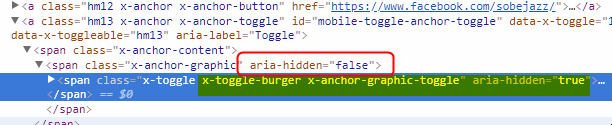
I have a site built with Pro. The client I built the site for is blind. When he parses the site with his screen reader, the mobile menu is not being detected. When I inspected the code I can see that there is an ‘aria-hidden: true’ declaration on the toggle. My question is where is that code coming from so I can change it to aria-hidden: false?

Thanks,
Dallas

Update: I found the code in framework -> views -> partials - anchor.php
I changed aria-hidden=“true” to aria-hidden=“false”

However, the screen reader skips over the toggle when using the tab key to change focus.
The same issue exists with the search icon as well.

Hello @pecktron2000,

Thanks for writing in! :slight_smile:

It could be that their is tabindex="-1" that triggers toggle and search icon to skip.

Can you provide us your website URL on a secure note? We’ll try to check this for you.

Thank you.

HI,
Thanks, I added a secure note with the URL. It looked liked tab indexes were set to 0 for anchors.
-Dallas

Hi,

Please update PRO to latest version(Pro 2.0.4 ) and see if that fixes the issue.

Don’t forget to create full backup of your site before updating.

Thanks

Hi,
I updated the theme and the issue persists.
Please advise.
Thanks,
Dallas

Hey @pecktron2000,

It is the toggle icon or the x-toggle-burger that is hidden. It’s parent elelment x-anchor-graphic is set to false. It is semantically correct so the cause of the issue might be because the content is set to false, it is empty for the screen reader.

Regarding the focus, it is likely because the search and menu toggles which are actually links does not have an href unlike the Facebook link.

Since you already found the file try adding href="#". See https://youtu.be/7nMcAtu0-lg

Let us know if that worked and we’ll post this in our issue tracker.

Thanks.

Hi,
Thanks for the reply. I was the one who set aria-hidden to ‘false’. It was set to true. Should I change it back to ‘true’?

I thought it shouldn’t be hidden?

The file I found was for all anchors. If I set the href to a null link won’t it effect all links?

Where is the code for the header menu toggles coming from? I can’t seem to find it.

Thanks,
Dallas

Hi there,

Shouldn’t it be hidden? Then it must be set to false. But, I can’t confirm what’s happening when it’s scanned, what tools they use to analyze the page?

Thanks!

Hi,
The client uses JAWS which is industry standard screen reader. The problem is that the toggle is not getting focus. I think the suggestion above to add an href to the anchor tag is a good one. i just need to know where the code for the toggles is so I can try adding the href.

Thanks,
Dallas

Hi there,

I see, in that case, please follow the recommendation of adding # to the href. It’s where you changed aria-hidden=“true” to aria-hidden=“false”. I can’t verify it since your site is still on old version.

But with the latest version, you can simply change it under \includes\views\partials\anchor.php and by changing this code

if ( isset( $anchor_href ) && ! empty( $anchor_href ) ) {
  $atts['href'] = $anchor_href;
}

with this

if ( isset( $anchor_href ) && ! empty( $anchor_href ) ) {
  $atts['href'] = $anchor_href;
} else {
  $atts['href'] = '#';
}

Hope this helps.

Hi,
OK, thanks. I’m gonna try adding that.
Best,
Dallas

Let us know how it goes!

Yes, that worked. Thank you all!

You are most welcome!

Hi,
Unfortunately a side effect of adding the above code is that now all of my navigation links in the main navigation are now null links.

Any suggestions?
Thanks,
Dallas

Hello there,

I can see that your navigation menu has href URL’s. Can you send us a screenshot image on what you meant by null links?

Thank you.

Hi,

I upgraded to the latest version of Pro and now the anchor.php file is in a different place. It is now in pro - cornerstone - includes - views - partials - anchor.php.

I added the code from this thread to the anchors.php but nothing seems to have changed. I still can’t get the focus to select my mobile menu toggle or my search icon in the cornerstone header.

Do you have any ideas?

Thanks,
Dallas

Hey Dallas,

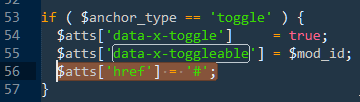
Try targeting the toggles only because they’re the ones that has no href attribute. In pro\cornerstone\includes\views\partials\anchor.php, try adding $atts['href'] = '#'; inside the toggle condition like this

I’ve just tested this in my staging site and found that adding href is not necessary because focusing works out of the box. See https://youtu.be/H3ItOzY6Z9g. I’m not sure though why this happens in your site. Would you mind giving us WP Admin and FTP access of your staging site in a Secure Note?

Thanks.

Hi,
I tried adding the above code to anchors.php in my child theme. It didn’t seem to solve the issue.
Here are WP and FTP credentials. Thanks for looking into this.
-Dallas

http://southbeachjazzfest.ransomemultimedia.com

Hey @pecktron2000,

I’d like to check what happens when I activate the parent theme but the result was a blank content in the front-end (see Secure Note) so I suspect there is something wrong with the parent theme in your site. Please try reinstalling the Pro theme and also deactivate all third party plugins to ensure nothing is affecting the functionality.

Thanks.